
GraphQL Park: A Modern GraphQL IDE Built for SitecoreAI Developers
Published: 10 July 2026
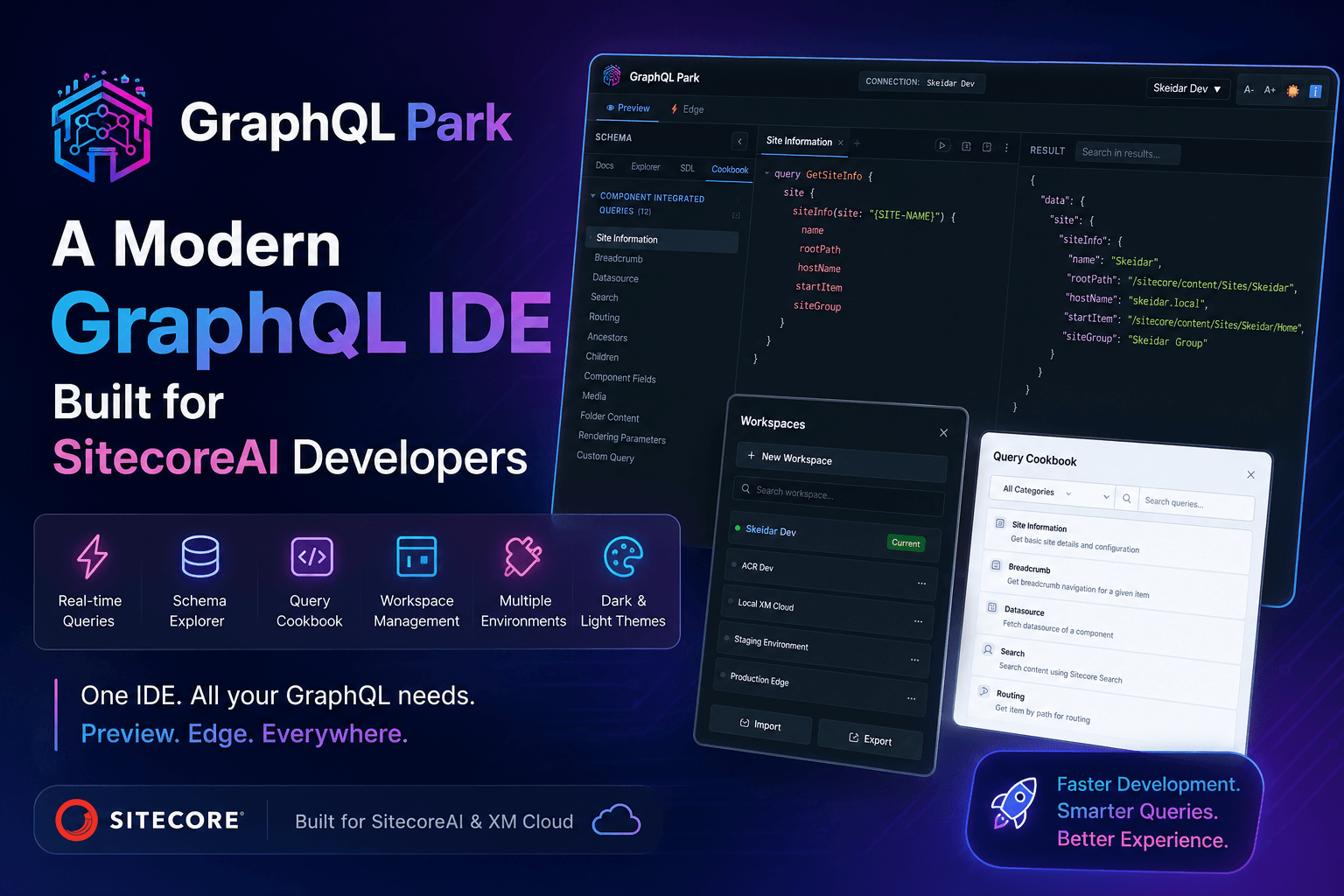
Making GraphQL development faster, cleaner, and more productive for the Sitecore community.
Quick Links
🌐 Live Application: https://www.graphql-park.com/
📖 Documentation & About: https://www.graphql-park.com/about
If you've been working with SitecoreAI or XM Cloud, chances are you've spent a fair amount of time using the built-in GraphQL Playground.
It works. It lets you execute queries, inspect schemas, and test APIs.
But after using it daily across multiple projects, I kept running into the same friction.
Every new environment meant manually entering endpoints and API keys. Switching between Preview and Edge APIs wasn't always seamless. I often found myself searching through previous projects for commonly used queries or repeatedly navigating the schema to find the fields I needed.
None of these problems were major on their own - but together, they slowed down development and broke my flow.
As developers, we spend countless hours inside our tools. Even small inefficiencies become noticeable over time.
I wanted a GraphQL IDE that felt like a modern developer workspace rather than just a playground.
That idea became GraphQL Park.
What is GraphQL Park?
GraphQL Park is a dedicated GraphQL IDE built specifically for SitecoreAI developers.
It combines everything needed to query, explore, debug, and manage GraphQL APIs in one modern interface while supporting both Sitecore Marketplace integration and standalone development.
Rather than focusing only on executing queries, GraphQL Park focuses on improving the entire developer experience.
Whether you're working with:
- SitecoreAI
- XM Cloud
- Headless Services
- Local CM instances
- Staging environments
- Production Edge APIs
GraphQL Park provides a consistent workspace that makes switching between environments effortless.
Why Build Another GraphQL Tool?
This is probably the first question that comes to mind.
The answer is simple:
I wasn't trying to replace the existing GraphQL Playground.
I wanted to build something designed around how Sitecore developers actually work.
Typical development often looks like this:
- Test locally
- Verify changes in staging
- Compare Preview vs Edge
- Switch between multiple customer projects
- Reuse queries
- Explore unfamiliar schemas
- Debug responses
During this workflow I repeatedly wished I had features such as:
- Saved connections
- Quick environment switching
- Better documentation
- Built-in query examples
- Workspace portability
- Modern UI Theme support
- Better schema exploration
Instead of waiting for those features to appear, I decided to build them.
Two Ways to Use GraphQL Park
One of the biggest goals was flexibility.
GraphQL Park can be used in two different ways depending on your workflow.
Connected Mode (Sitecore Marketplace)
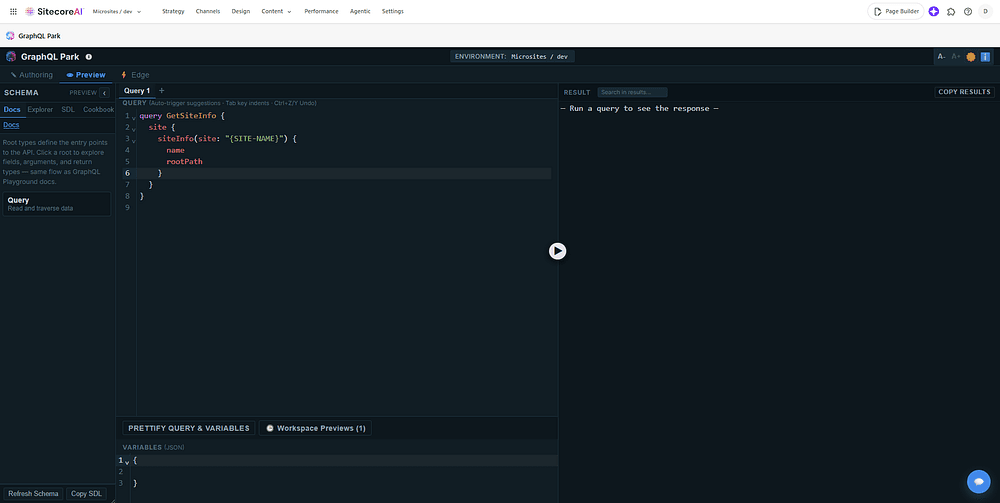
For developers working directly inside SitecoreAI, GraphQL Park is available as a Marketplace application.
Once launched, it securely connects to your current Sitecore environment through the Marketplace SDK, allowing you to start querying immediately without manually configuring endpoints or credentials.
This mode is perfect for everyday development inside the Sitecore ecosystem.
Benefits include:
- No manual setup
- Seamless integration
- Instant access to your Sitecore environment
- Faster developer onboarding
Standalone Mode
Not every GraphQL endpoint lives inside SitecoreAI.
Sometimes you're working with:
- Local containers
- Customer environments
- Staging servers
- Production Edge APIs
- Development sandboxes
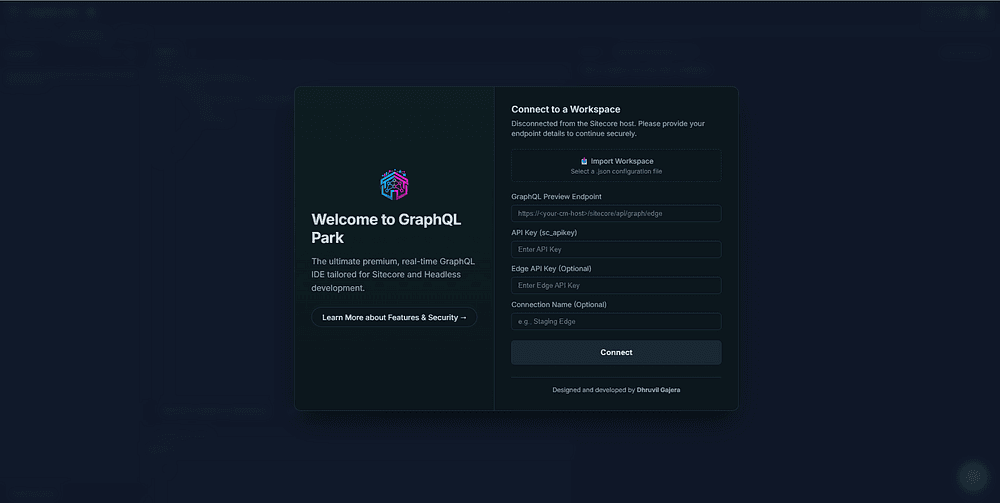
For those scenarios, GraphQL Park also runs as a standalone web application.
Simply enter:
- GraphQL Preview Endpoint
- Sitecore API Key
- Optional Edge API Key
- Connection Name
Connect once and start working.
This makes GraphQL Park useful regardless of where your Sitecore instance is hosted.
A Modern Developer Workspace
The goal wasn't simply to redesign the UI.
It was to build an interface developers enjoy spending hours in.
The application includes:
- Modern dark and light themes
- Responsive layout
- Clean typography
- Distraction-free editor
- Organized panels
- Better spacing
- Improved readability
Small design improvements make long development sessions much more comfortable.
Workspace Management
One of the first features I implemented was Workspace Management.
Instead of entering the same endpoint every day, GraphQL Park remembers your environments.
You can:
- Save connections
- Rename workspaces
- Switch between projects instantly
- Delete unused environments
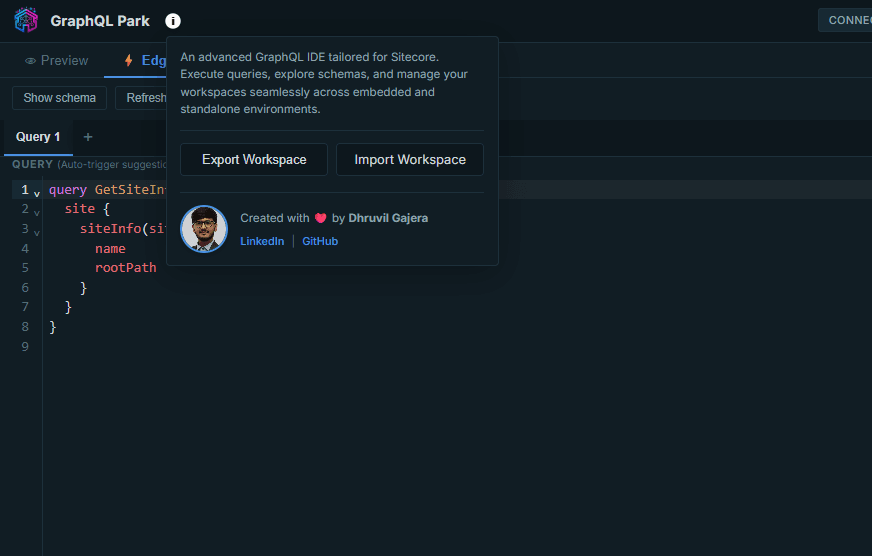
- Export workspace configurations
- Import workspace files on another machine
This is especially useful for developers working across multiple clients.
Preview and Edge APIs
Sitecore developers frequently work with both Preview and Edge GraphQL endpoints.
Instead of opening different tools or changing configurations repeatedly, GraphQL Park allows you to switch between Preview and Edge modes from a single interface.
This makes validating published and unpublished content much easier.
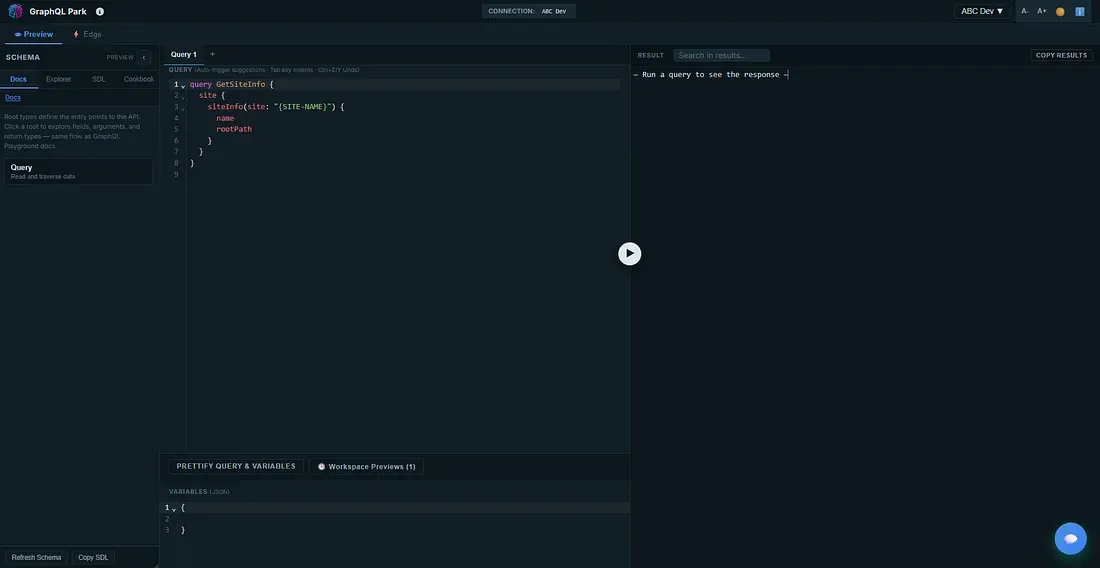
Interactive Schema Explorer
Understanding a GraphQL schema should be effortless.
GraphQL Park includes an interactive schema explorer that allows developers to:
- Browse available types
- Discover fields
- Inspect arguments
- Navigate relationships
- Explore documentation
Instead of constantly referring to external documentation, everything is available directly within the IDE.
Query Cookbook
One of my favorite additions is the Query Cookbook.
Every Sitecore developer has a folder filled with old GraphQL queries copied from previous projects.
I wanted to eliminate that habit.
GraphQL Park includes ready-to-use query templates for common Sitecore scenarios.
Examples include:
- Site Information
- Component Datasource
- Breadcrumb Navigation
- Ancestor Retrieval
- Routing Information
- Advanced Search
- Content Trees
- Search Queries
Each snippet can be inserted into the editor with a single click, helping developers get started much faster.
Modern Query Editor
The editor provides a much smoother writing experience.
Features include:
- Syntax highlighting
- Auto-indentation
- Auto-complete suggestions
- Variables panel
- Multiple query tabs
- Query formatting
- Response search
- Copy results
Everything expected from a modern GraphQL IDE is available in one place.
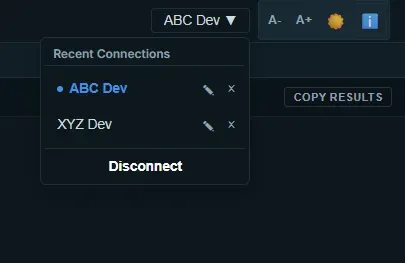
Recent Connections
Switching between projects is now effortless.
GraphQL Park maintains a list of recent connections, allowing developers to reconnect with a single click instead of re-entering credentials every time.
This small feature saves a surprising amount of time during everyday development.
Theme Support
Every developer has a preferred working style.
GraphQL Park includes both:
- Dark Theme
- Light Theme
Switching themes is instant, allowing you to work in the environment that feels most comfortable.
Feedback Built Into the Product
Community feedback is incredibly valuable.
Instead of requiring users to search for contact information or open GitHub issues, GraphQL Park includes a built-in feedback form so suggestions and ideas can be shared directly from within the application.
I hope this encourages more collaboration with the Sitecore community.

GraphQL Park vs the Default GraphQL Playground
While the default Sitecore GraphQL Playground is a great starting point, GraphQL Park focuses on making daily development more productive.
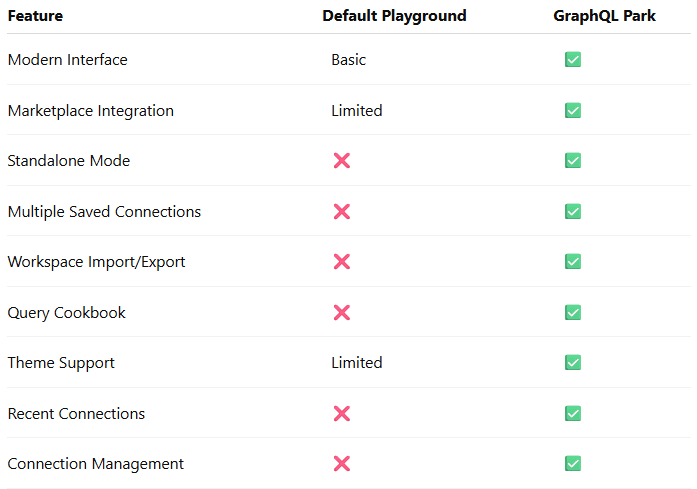
The objective isn't to replace the existing Playground.
It's to provide a more complete workspace tailored to the way Sitecore developers actually work.
Who Is GraphQL Park For?
GraphQL Park is designed for:
- SitecoreAI Developers
- XM Cloud Developers
- Headless Developers
- Front-end Developers
- Full-stack Developers
- Technical Architects
- Sitecore MVPs
- Anyone working with Sitecore GraphQL APIs
Whether you're building a small proof of concept or working across enterprise environments, GraphQL Park aims to make your daily workflow more efficient.
Final Thoughts
GraphQL Park started as a personal productivity project.
I wanted a better way to work with Sitecore GraphQL APIs every day.
As the project evolved, I realized many developers experience the same frustrations, so I decided to make it available to the wider Sitecore community.
If GraphQL Park helps you spend less time configuring environments and more time building great digital experiences, then it has achieved exactly what it was built for.
I'd love to hear your feedback, feature requests, and ideas for future improvements.
Try GraphQL Park
🌐 Website: https://www.graphql-park.com/
If you're a Sitecore developer, I'd love to hear what you think. Your feedback will help shape the future of GraphQL Park.