
Sitecore Marketplace Media Optimizer
Published: 11 June 2026
Introduction to Sitecore Marketplace & the Media Optimizer
What is Sitecore Marketplace?
Sitecore Marketplace is an extensibility framework that allows developers to build custom applications that integrate directly into Sitecore's AI environment. These applications - called extensions - live inside predefined host surfaces within the Sitecore interface, such as the Pages editor, the Dashboard, custom fields, and Fullscreen experiences.
Extensions communicate with the host environment through the Marketplace SDK Client, a lightweight JavaScript library that establishes a post Message bridge between the extension app (rendered in an iframe) and the host Sitecore application.
The Media Optimizer Application
The Media Optimizer is a production-grade Marketplace extension built on this framework. It addresses critical, real-world need: media asset governance. In any content-driven Sitecore project, images accumulate rapidly - from hero banners and product shots to icons and background graphics. Without systematic oversight, several problems emerge:
- Missing ALT text - damaging accessibility compliance (WCAG) and SEO
- Oversized images - slowing page load times and degrading Core Web Vitals
- Bad aspect ratios - causing layout shift and poor visual presentation
- Unsupported formats - missing opportunities for modern formats like WebP and AVIF
The Media Optimizer solves these problems by providing two complementary interfaces:
| Interface | Location | Purpose |
| Page Media Inspector | Pages Context Panel | Analyze media on the current page being edited |
| Media Optimizer Dashboard | Standalone App | Full audit of the entire project media library |
Both interfaces share a common analysis engine that scores each media item from 0 to 100 across four quality dimensions, then offers one-click remediation for the most common issues.
Built With
- Next.js 15 — App Router, server/client components, file-based routing
- React 19 — Hooks, memoization, concurrent features
- @sitecore-marketplace-sdk/client v0.2.0 — SDK initialization, context queries, GraphQL mutations
- @sitecore-marketplace-sdk/xmc v0.2.0 — SitecoreAI -specific module for authoring APIs
- TypeScript 5.9 — Full type safety across the codebase
2. System Architecture
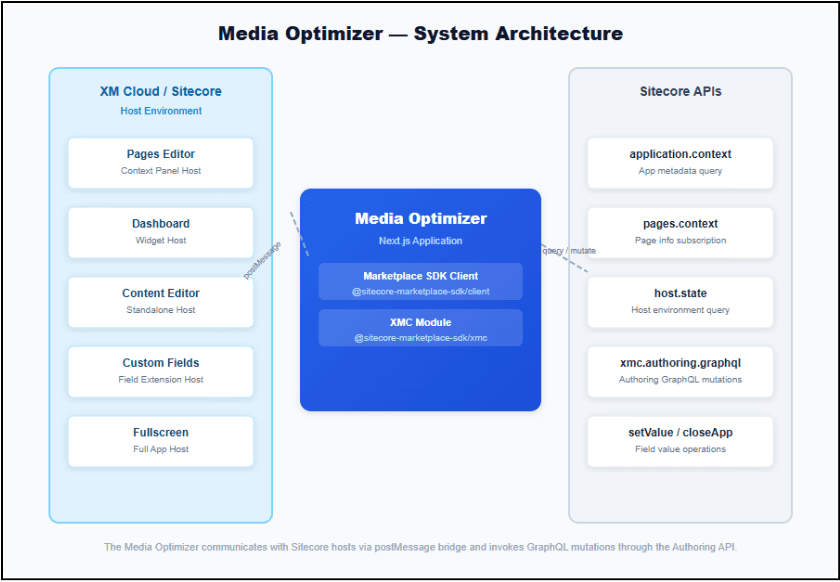
The Media Optimizer follows a hosted extension architecture where the application runs inside an iframe embedded within the Sitecore AI interface. Communication between the extension and the host happens exclusively through a secure postMessage bridge provided by the Marketplace SDK.
Architecture Layers
1. Host Layer (Sitecore AI)
The host environment provides five extension surfaces. Each surface renders the Media Optimizer in an iframe with specific dimensions and capabilities:
- Pages Editor - context panel sidebar (fixed width, scrollable)
- Dashboard - widget card
- Content Editor - standalone full-page experience
- Custom Fields - inline field editor
- Fullscreen - immersive Pages experience
2. Communication Layer (Marketplace SDK)
The ClientSDK class establishes and manages the postMessage channel. It provides three core operations:
- client.query(channel, options?) — Request data from the host. Supports one-time queries and subscriptions (e.g., pages.context with subscribe: true).
- client.mutate(channel, payload) — Send mutations to the host, primarily xmc.authoring.graphql for GraphQL operations.
- client.setValue(value) / client.closeApp() — Custom field-specific operations to update field values and close the editor panel.
3. Application Layer (Media Optimizer)
The Next.js application handles:
- SDK initialization with automatic retry logic (up to 3 attempts)
- Context resolution - retrieving application.context, pages.context, and host.State
- Media extraction - parsing page fields, presentation details, and data source renderings for media references
- Analysis - scoring each image across four quality dimensions
- Remediation - ALT text updates via Authoring GraphQL mutations
Initialization Flow
- Extension mounts in host iframe
- useMarketplaceClient() hook fires
- ClientSDK.init({ target: window.parent, modules: [XMC] })
- Retry loop: up to 3 attempts with 1s delay between retries
- On success: client.query("application.context")
- On failure: error state exposed to UI
- Component renders context-specific UI
The useMarketplaceClient Hook
Located at src/utils/hooks/useMarketplaceClient.ts, this custom hook encapsulates all SDK lifecycle management. Key design decisions include: a singleton client cached at the module level to prevent duplicate initialization, a useRef flag to prevent concurrent initialization attempts, proper cleanup on unmount, and memoized return values.
3. Extension Points
The Media Optimizer demonstrates all needed Sitecore Marketplace extension points. Each extension point is a separate route in the Next.js app router under src/app/{extension-type}/page.tsx.
1. Pages Context Panel Extension (/pages-contextpanel-extension)
The primary media inspection interface (1,321 lines — the most feature-rich extension). It subscribes to pages.context with subscribe: true for real-time updates, queries application.context and host.state, extracts all media references from the current page, fetches detailed media metadata via Authoring GraphQL, and renders a full audit panel with per-media-item scoring and one-click ALT text updates.
2. Standalone Extension (/standalone-extension)
Full media library management dashboard (1,013 lines). Queries the entire project media library using a Sitecore search index query via GraphQL. Provides summary dashboard cards, a searchable/filterable table, bulk ALT text generation, Content Editor integration, and clipboard support for media item IDs.
4. Media Analysis & Scoring Engine
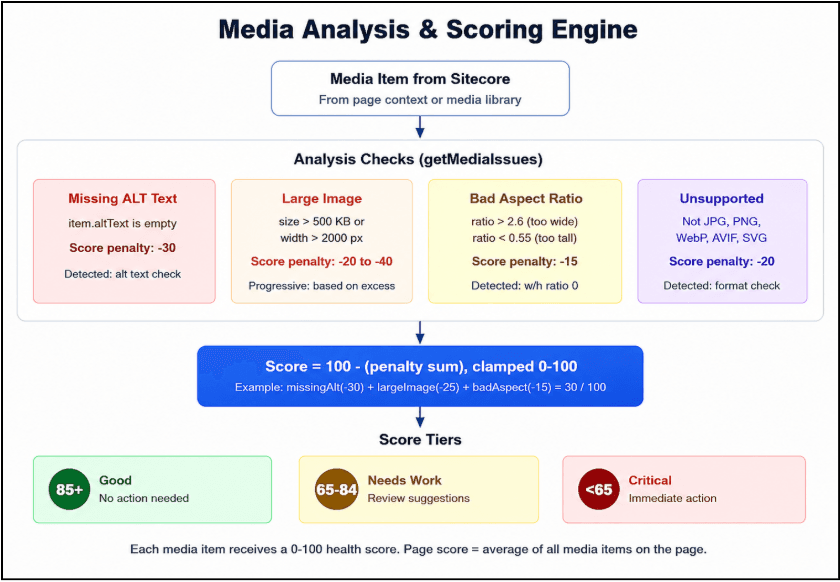
At the heart of the Media Optimizer is a deterministic analysis engine that evaluates each media item against four quality criteria. The engine produces a 0-100 optimization score that reflects the overall health of the image.
Analysis Criteria
1. Missing ALT Text (Penalty: -30)
Check: item.altText.trim() === "". ALT text is the single most impactful accessibility attribute for images. Screen readers rely on ALT text to describe images to visually impaired users. Missing ALT text is penalized heavily because it represents both an accessibility failure and a missed SEO opportunity.
2. Large Image Size (Penalty: -20 to -40, progressive)
Check: item.sizeKb > 500 or item.width > 2000. The penalty scales progressively images just over 500 KB receive a smaller penalty, while images exceeding by hundreds of KB receive increasingly severe penalties.
3. Bad Aspect Ratio (Penalty: -15)
Check: ratio > 2.6 (panoramic) or ratio < 0.55 (portrait extreme). Images that are extremely wide or tall relative to their placement may cause layout shift or visual distortion.
4. Unsupported Format (Penalty: -20)
Check: format is not in supported list (jpg, jpeg, png, webp, avif, svg). Modern image formats like WebP and AVIF offer significantly better compression than legacy formats.
Score Calculation
score = 100 - sum(all applicable penalties)
score = Math.max(0, Math.min(100, score))
Score Tiers
| Range | Label | Color | Action Required |
| 85-100 | Good | Green | None |
| 65-84 | Needs Work | Yellow | Review suggestions |
| 0-64 | Critical | Red | Immediate action |
When analyzing a page (in the Pages Context Panel), individual media scores are averaged to produce a page-level score: pageScore = Math.round(sum(itemScores) / itemCount). This allows content editors to quickly assess the overall media health of any page before publishing.
5. Pages Context Panel - Page-Level Media Inspector
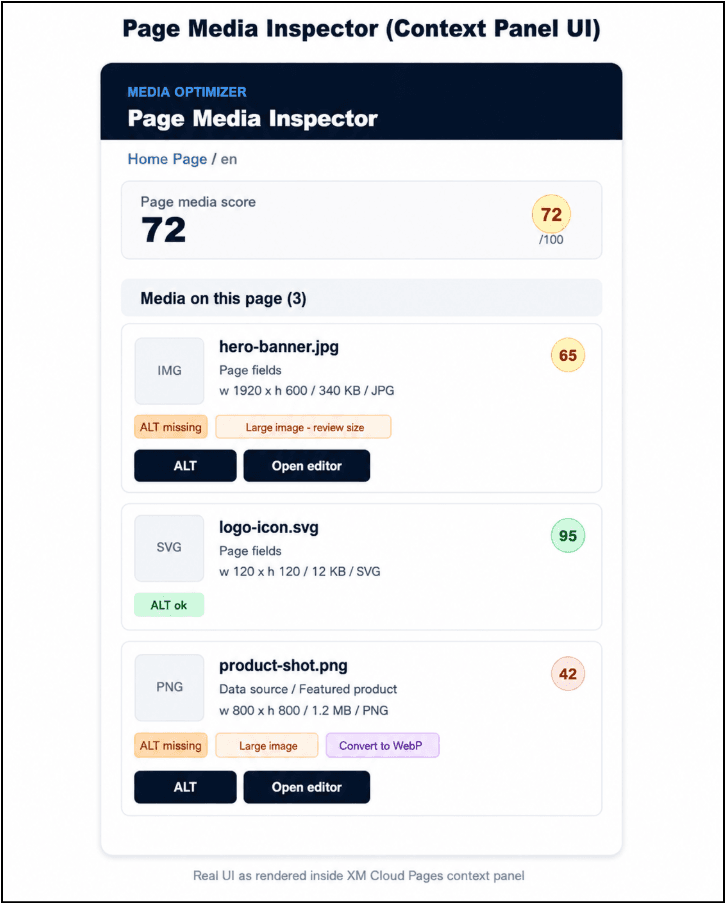
The Pages Context Panel extension is the most feature-rich component in the Media Optimizer. It provides content editors with a real-time media audit directly inside the Sitecore AI Pages editor.
Step 1: Context Acquisition
When the extension mounts, it makes three parallel queries: application.context (app metadata), pages.context with subscribe: true (real-time page changes), and host.state (Sitecore AI tenant URL).
Step 2: Media Reference Extraction
The extractPageMediaReferences() function walks the page fields recursively, identifying direct media URLs, Sitecore Image field values (parsing mediaid, src, alt, width, height), and rich text fields containing <image> tags. The extractDataSourceReferences() function parses presentationDetails to find data source components and queries each for additional media references.
Step 3: Metadata Enrichment
Each media reference is resolved against the Sitecore Media Library. If the reference includes a GUID-style ID, the extension performs a GraphQL query to retrieve width, height, file size, format, and existing ALT text.
Step 4: Analysis & Rendering
The analyzed media list is displayed as a scrollable card list. Each card shows:
| Element | Description |
| Thumbnail | 64x64 preview image |
| File name | Source identifier |
| Source | Field or data source location |
| Dimensions | Width x Height |
| Size | KB or MB with formatting |
| Format | File extension |
| Score | 0-100 with color coding |
| ALT badge | Present (green) or Missing (red) |
| Issues | Tag-style badges for each detected issue |
| Actions | ALT generation + Content Editor link |
Remediation: One-Click ALT Text
The generateAltText() function creates descriptive text from the file name, stripping extensions and separators. The ALT update mutation is performed via xmc.authoring.graphql using the updateItem mutation against the master database.
6. Standalone Dashboard — Full Media Library Management
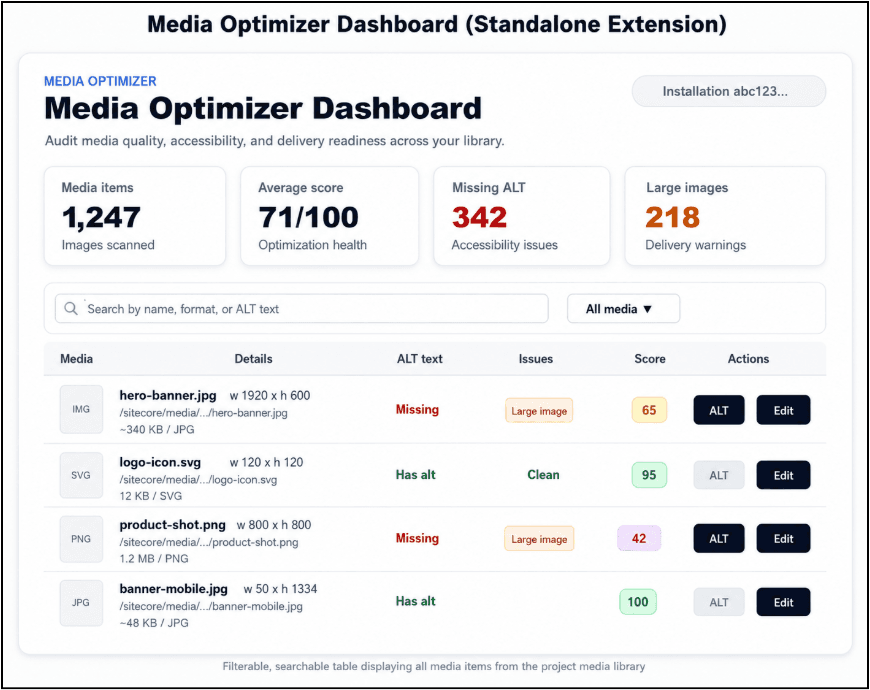
The Standalone Extension provides a complete media library management dashboard that gives developers and content managers a bird's-eye view of all media assets in the project.
Architecture
Unlike the Pages Context Panel (which analyzes only the current page), the Standalone Extension queries the entire media library using Sitecore's search index with a GraphQL search query filtered by image templates (Image, Jpeg, Png, WebP, Svg) under the media library path.
Dashboard Features
Summary Cards
Four key metrics provide an immediate health overview:
- Media Items - total count of images in the library
- Average Score - mean optimization score across all items
- Missing ALT - count of images lacking ALT text (accessibility risk)
- Large Images - count of oversized images (performance risk)
Search & Filter System
Users can narrow down the media list using text search (matches file name, ALT text, and format) and a filter dropdown (All media / Needs work / Missing ALT / Large images). The combination is processed client-side using useMemo for instant responsiveness.
Data Table
The main view is a feature-rich table with six columns: Media (thumbnail + name + path), Details (dimensions + size + format), ALT text, Issues (tag badges), Score (color-coded), and Actions (ALT generation + Content Editor link).
Media URL Resolution
The Standalone Extension handles a complex challenge: resolving Sitecore media library paths to accessible URLs. The getMediaThumbnailUrl() function handles absolute HTTPS URLs, /-/media/ paths (converted to /-/jssmedia/), Sitecore Media Library shell URLs, and media library paths with proper encoding.
7. Best Practices, Performance & Conclusion
Best Practices for Media Optimization
1. ALT Text as a First-Class Citizen
ALT text is the single highest-impact, lowest-effort improvement you can make. The Media Optimizer penalizes missing ALT text by 30 points - the largest single penalty - because it affects both accessibility and SEO. Write descriptive, context-aware ALT text; use the auto-generate feature as a starting point; and ensure ALT text describes the image's function, not just its content.
2. Image Size Budgets
Establish size budgets for different image types:
| Image Type | Budget |
| Hero / Full-width banners | < 200 KB |
| Content images | < 100 KB |
| Thumbnails | < 30 KB |
| Icons / SVGs | < 10 KB |
3. Modern Image Formats
Convert legacy formats to WebP or AVIF. WebP is supported in all modern browsers and is ~25-35% smaller than JPEG at equivalent quality. AVIF offers even better compression (~50% smaller than JPEG). Always prefer SVG for icons, logos, and illustrations.
4. Responsive Images
Ensure images are served at appropriate dimensions for their placement. A 1920px-wide image used in a 300px-wide card container wastes bandwidth and slows page load. Use Sitecore's image resizing capabilities or a CDN with on-the-fly transformation.
Performance Considerations
The Media Optimizer is built with Next.js and leverages code splitting. Each extension point route loads independently. The media library search query uses pageSize: 1000 (consider cursor-based pagination for libraries over 10,000 items). Context acquisition runs in parallel, and media lists are memoized with useMemo to prevent recalculation on unrelated state changes.
Extending the Application
Ideas for future enhancements:
- Automatic WebP conversion - server-side API that converts images on upload
- Bulk operations - select multiple media items and apply actions in batch
- Scheduled audits - run media library scans on a schedule and email reports
- Custom scoring rules - configurable penalty weights via the Sitecore dashboard
- DAM integration - connect to Digital Asset Management for enriched metadata
- AI cropping recommendations - suggest optimal crops for different placements
Conclusion
The Sitecore Marketplace Media Optimizer demonstrates the power and flexibility of the Sitecore Marketplace extension framework. By combining the Pages Context Panel for real-time page-level audits with the Standalone Dashboard for comprehensive library management, it provides content teams with the tools they need to maintain high-quality, performant, and accessible media assets.
Whether you use the Media Optimizer as-is or as a reference for building your own extensions, it represents a production-ready approach to solving real-world content management challenges within the Sitecore ecosystem.
Resources
| Resource | URL |
| Marketplace SDK (npm) | https://www.npmjs.com/package/@sitecore-marketplace-sdk/client |
| Next.js Documentation | https://nextjs.org/docs |
| WCAG Accessibility Guidelines | https://www.w3.org/WAI/standards-guidelines/wcag/ |
| Apache License 2.0 | https://www.apache.org/licenses/LICENSE-2.0 |

Vikesh Bhavsar
Senior Software Engineer – SitecoreAI & SXA
Vikesh is a Sitecore professional at Addact with 4 years of experience, specializing in SitecoreAI, Sitecore XP, SXA, Headless JSS, and ASP.NET MVC. He focuses on building scalable, performance-driven CMS solutions and Sitecore Page Builder compatible components for personalized digital experiences.