
Field Mapping: Sitecore Content Hub to Sitecore CMS
Published: 31 March 2026

Bridging the gap between an omnichannel content strategy and web delivery is one of the most powerful capabilities of the Sitecore ecosystem. If you are integrating Sitecore Content Hub (CH) with Sitecore Experience Platform (XP) or Sitecore Experience Accelerator (SXA), understanding how data flows between the two systems are critical.
This guide breaks down the exact field types available in Content Hub and how to map them seamlessly into Sitecore XP/SXA using the Sitecore Connect for Content Hub (CMP Connector).
Anatomy of Sitecore Content Hub Field Types
Before mapping data, we need to understand the source. Content Hub categorizes fields into simple types and complex/relational types.
1. Simple Field Types
These fields store straightforward data values and map directly to native Sitecore XP field types.
- Single line Text: Used for single lines of text. Perfect for Titles or Headings.
- Multiline Text: Used for multi-line text without HTML formatting. Ideal for summaries or meta descriptions.
- Number: Stores integer values (e.g., sorting weights or inventory counts).
- Boolean: A simple true/false toggle.
- DateTime: Stores date and time in ISO 8601 format.
2. Complex & Relational Field Types
These fields handle rich content and relationships between different entities in Content Hub.
- Rich Text: Stores text with formatting. Crucial detail: Content Hub saves the value and formatting separately as JSON, which the connector must parse into HTML for Sitecore's Rich Text field.
- Media: A relation field linking a content item to digital assets (images, videos, documents) stored in Content Hub DAM.
- Reference: A relation field linking a content item to other content items (e.g., an "Author" entity linked to a "Blog" entity).
- Select (Taxonomy): A relation field linking content to predefined taxonomy values (e.g., categories, tags).
The Core Mapping Mechanisms in Sitecore XP
Data synchronization relies on the Azure Service Bus, which listens for trigger events in Content Hub. When an entity is created or updated, the message is pushed to Sitecore XP.
Inside Sitecore XP, mappings are handled under this specific path in the Content Editor: /sitecore/system/Modules/CMP/Config/
To map Content Hub fields to your SXA or XP templates, you utilize four specific mapping items provided by the CMP module:
1. Entity Mapping (The Foundation)
Before mapping individual fields, you must map the Content Hub Entity Type to a Sitecore Template.
- Content Type Id: The exact identifier from Content Hub (e.g., M.Content.Blog).
- Template: The Sitecore template you created for this content. (Note: Your Sitecore template MUST inherit from the Content Hub Entity base template so the connector can track the EntityIdentifier).
- Bucket: The destination folder/bucket in Sitecore where imported items will be created.
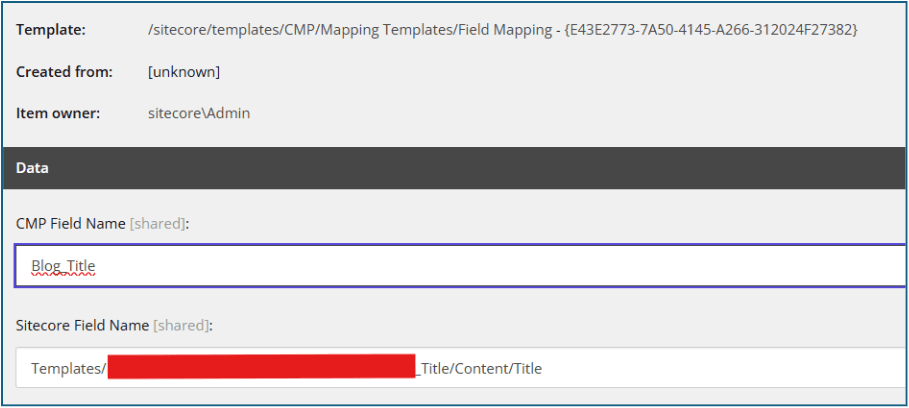
2. Field Mapping (For Simple Types)
Used for 1:1 mapping of primitive data types (Single line Text, Multi line Text, Richtext, DateTime).
For that we can use template /sitecore/templates/CMP/Mapping Templates/Field Mapping
- CMP Field Name: The exact system name of the field in Content Hub (e.g., Title_en-US).
- Sitecore Field Name: The exact name of the field on your Sitecore template.
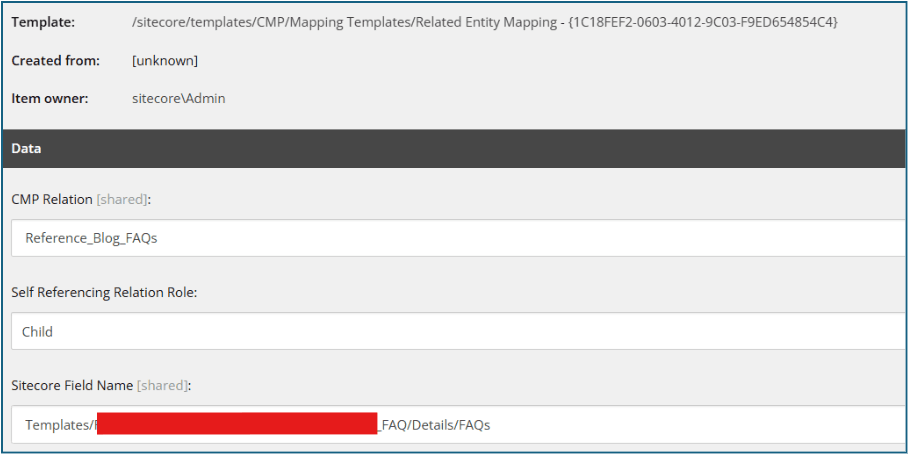
3. Relation Field Mapping (For Media & References)
Because Content Hub treats assets and related content as relationships, you cannot use standard Field Mapping for images or droplinks.
- CMP Relation: The internal name of the relationship in Content Hub (e.g., ContentRepositoryToAsset).
- Self-Referencing Relation Role: it is the relation of this reference field to the main content type. Value should be Parent or Child
- Sitecore Field Name: The corresponding Sitecore field (usually an Image field, Multilist, Droplink, or Treelist).
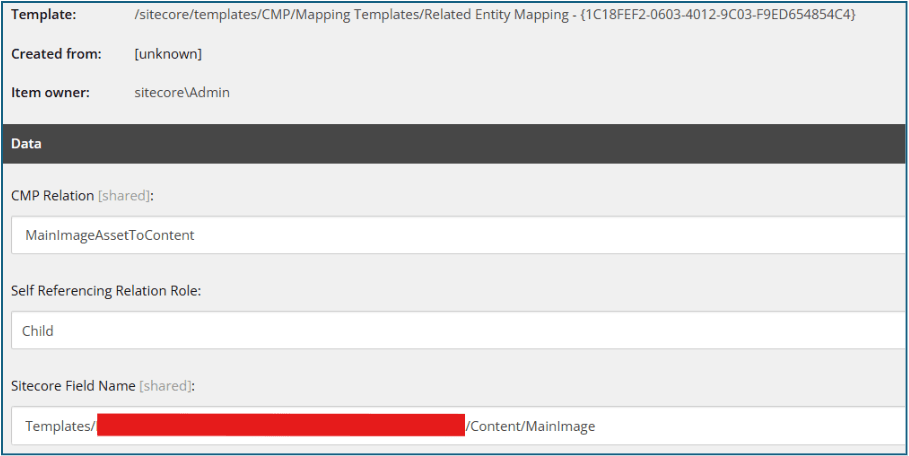
- CMP Relation: The internal name of the relationship in Content Hub (e.g., MainImageAssetToContent).
- Self Referencing Relation Role: it is the relation of this reference field to the main content type. Value should be Child
- Sitecore Field Name: The corresponding Sitecore field for image (e.g., MainImage, BannerImage)
Best Practices
- Case Sensitivity: Field names and relation names are strictly case-sensitive. A mismatch is the most common reason data fails to sync.
- Image Attributes: If you need to map specific asset metadata (like Alt Text or Copyright) from the DAM to the Sitecore Image tag, you configure this in /sitecore/system/Modules/DAM/Config/Mapping by adding a new Attribute mapping item.
Successfully integrating Sitecore Content Hub with XP/SXA relies on a precise understanding of how simple, relational, and taxonomy fields map across both platforms. By mastering these core configurations and knowing when to leverage custom converters, you can build a seamless, automated bridge for your omnichannel content. Ultimately, a well-architected setup eliminates manual data-entry issues and empowers your teams to deliver digital experiences at scale.

Meet Kanzariya || Team Lead
Senior Full-Stack Developer – Sitecore, Strapi & Headless CMS
Meet is a .NET and Sitecore professional at Addact with 6 years of experience, specializing in Sitecore XP, SXA, Content Hub, and CDP, and delivering scalable, personalized CMS solutions. His core skills include .NET Core development, SQL scripting, and technical documentation, enabling him to deliver reliable and high-performing digital platforms.