
The Practical Guide to use Actions in Sitecore Content Hub
Published: 17 April 2026
Actions are one of the most powerful automation features in Sitecore Content Hub.
They allow administrators and developers to trigger logic, execute scripts, run background automation, or provide custom operations to end users — directly from the Content Hub UI or system events.
What Are Actions in Content Hub?
In Sitecore Content Hub, actions are components that perform a specific task. You can trigger them manually or use a trigger or APIs to run actions automatically. You can also trigger them individually or in bulk.
Actions can:
- Run scripts
- Update entity data
- Modify relations
- Trigger workflows
- Execute bulk operations
- Fire background logic
- Provide custom buttons in the UI
Think of Actions as commands, and Scripts as the logic Actions execute.
Actions define what should happen and when, while Scripts define how it happens.
Why Actions Matter
From a developer and system architecture perspective, Actions matter because they:
- Provide a controlled entry point for custom logic (without modifying core platform code)
- Enable integration with external systems (APIs, Azure Service Bus etc)
- Allow business logic enforcement (validations, data syncing, lifecycle transitions)
- Support bulk operations for efficiency
- Aid audit and monitoring, as the platform tracks executions.
Types of Actions in Content Hub
Content Hub provides multiple action types — each serving a different purpose.
1. Action Script
Execute a predefined script (C# script, .csx, or similar) inside Content Hub. Useful for custom logic, calculations, updates, etc. Script must be deployed & referenced; consider CI/CD for script versioning.
2. API call
Makes an HTTP call to an external API (GET/POST/PUT) when triggered. It has Fields: Method, API URL (can reference a setting), Timeout, Headers & Values (which may use context variables).
3. Azure Event Hub
Send a message to an Azure Event Hub. It must have Connection string, EventHub name.
4. Azure Service Bus
Post to an Azure Service Bus (topic or queue). Provide connection string, destination type (topic/queue), destination name
5. M Azure Service Bus
A variation specific to SCH’s managed Azure Service Bus environment. (Used e.g., with XM Cloud connector). It connecting SCH to XM Cloud environment via message bus.
6. Print Entity Generation
Generate a PDF (or other format) of one or more entities based on a print-template. It need Configure of Definition (entity type), Template (print template).
7. Reporting Channel
Log an entry to the system’s reporting/log pipeline (so you can view charts/reports). Create action type “Reporting channel”, then configure what event/data to log.
8. Start State Machine
Automatically start a state flow (aka a state machine) on an entity. Useful for workflow automation.
How to Configure an Action – Step-by-Step
- Navigate to Manage → Actions inside your Content Hub tenant.
- Click “Create” to open the “Action detail” screen .

- Select the Action Type from the dropdown (e.g., API Call, Action Script, etc).
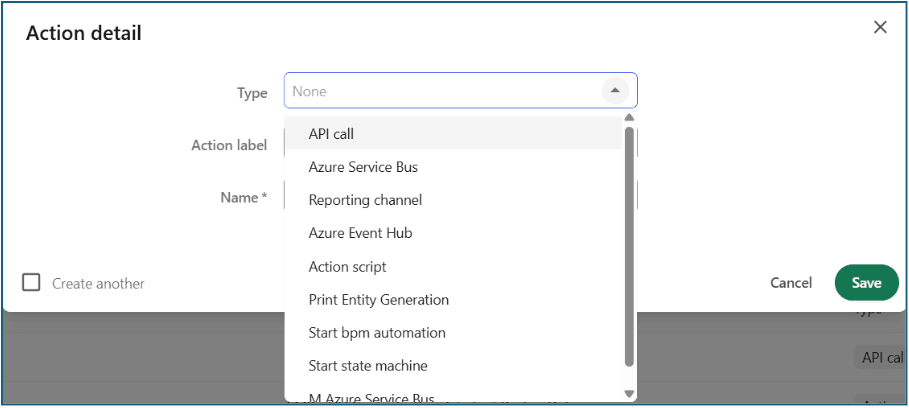
- Fill out the Label (what users will see) and Name (internal identifier).
Configure settings appropriate to the type:
For API Call: URL, HTTP method, headers, authentication
For Action Script: attach or select the script
For Azure Service Bus: queue/topic name, message format
For Print Generation: select print template
- Save the action.
- Test the action by executing it manually or via trigger/mass action and inspect the audit logs: “Auditing: You can view a reporting channel for actions, on the Auditing tab.”
Real-World Use Cases
Here are some examples you can use in your blog (developers love code and real scenarios):
- Auto-tagging assets: An Action Script runs when an asset is uploaded. It reads metadata and assigns taxonomy values.
- Bulk license update: A Mass Action of type “Action Script” or “API Call” runs across 1,000 assets to update license expiry.
- Product sheet generation: On a product entity, click “Generate PDF” — a Print Entity Generation action triggers a template and outputs a PDF.
- Content lifecycle move: When an asset is approved, a “Start State Machine” action transitions it from “Draft” → “Published”.
- Integration to PIM/ERP: When an asset reaches final status, an “Azure Service Bus” or “API Call” action sends a message to external PIM.
- Audit logging: Use “Reporting Channel” actions to capture user operations, then build monitoring dashboards.
Conclusion
Actions in Sitecore Content Hub make the platform smarter, faster, and easier to use. Whether you’re updating content, sending information to another system, generating documents, or starting an automated process, Actions help you get work done with just a click.
They simplify daily tasks, reduce manual work, and ensure that your content moves through the right steps at the right time. Once you understand the different Action types and when to use them, you can turn Content Hub into a highly efficient and automated workspace that supports your organization’s needs.
Check out our Sitecore Content Hub Implementation portfolio: https://www.addact.net/portfolio/content-hub-implementation

Mitesh Patel || Chief Technology Officer (CTO) | ADDACT
Sitecore AI Certified || XMCloud || OrderCloud Certified
Mitesh Patel is the Chief Technology Officer (CTO) at Addact with 12+ years of experience in enterprise CMS, digital experience platforms, and cloud-native application development. He specializes in Sitecore, Contentful, Strapi, Kentico, Umbraco, Contentstack, and .NET, helping organizations build scalable, secure, and future-ready digital solutions through modern CMS, headless architectures, AI-driven experiences, and cloud technologies.