
Introducing SiteElevate: Simplifying SEO Metadata in Sitecore CMS
Published: 14 May 2026

A custom Sitecore AI Marketplace app for Sitecore AI — built by Addact, now available to the wider Sitecore community.
Every Sitecore CMS website, no matter how well managed, has SEO content quality issues hiding in plain sight. A handful of pages without meta descriptions. media images missing alt text. Landing pages that are too thin to rank. Deeply nested children that nobody has reviewed in months. The problem isn’t that nobody cares it’s that there has never been an easy way to find all these issues at once, inside Sitecore, in real time.
That is exactly the problem the SiteElevate solves. It is a custom app for the Sitecore AI Marketplace that automatically scans every page on your Sitecore AI site and gives each one a health score showing you exactly where the gaps are, without ever leaving Sitecore.
What Is the SiteElevate?
The SiteElevate is a free custom app for the Sitecore AI Marketplace. It runs natively inside Sitecore, no external SEO tools, no spreadsheet exports, no guesswork. The moment you install it, every page on your site is evaluated against seven SEO and accessibility checks, scored on a 0–100 scale, and assigned a letter grade from A to F.
And because the app integrates at three different points in Sitecore, the right information shows up at the right moment in your workflow whether you are reviewing the entire site or fine-tuning a single page in Page Builder.
Who Is It For?
The SiteElevate was designed so that one install serves four very different audiences:
- Content Editors see the health score of the page they are editing right inside Page Builder and can fix issues without switching tools.
- Marketing Managers get a site-wide overview of content quality and a prioritized list of pages to address before the next SEO review.
- SEO Specialists can identify every page missing meta description, canonical tags, or alt text across hundreds or thousands of pages at once.
Where It Appears in Sitecore
The app installs into three places inside Sitecore, each designed for a specific moment in the day:
- Dashboard Widget on the SitecoreAI Home a compact overview with your site health score, grade distribution, top issues to fix, and worst-performing pages. A Pages tab inside the widget lets you browse and search every page with score filters.
- Standalone Full Dashboard from the Apps menu a full-screen audit view with a bar chart of top-scoring pages, a searchable and paginated table of all pages, grade filters, and a detailed breakdown for every page you click into.
- Page Context Panel inside Page Builder when you open any page in Sitecore AI Page Builder, the Content Health panel appears automatically in the left sidebar. It detects the open page and shows that page’s score and check results with zero clicks.
The 7 Health Checks Explained
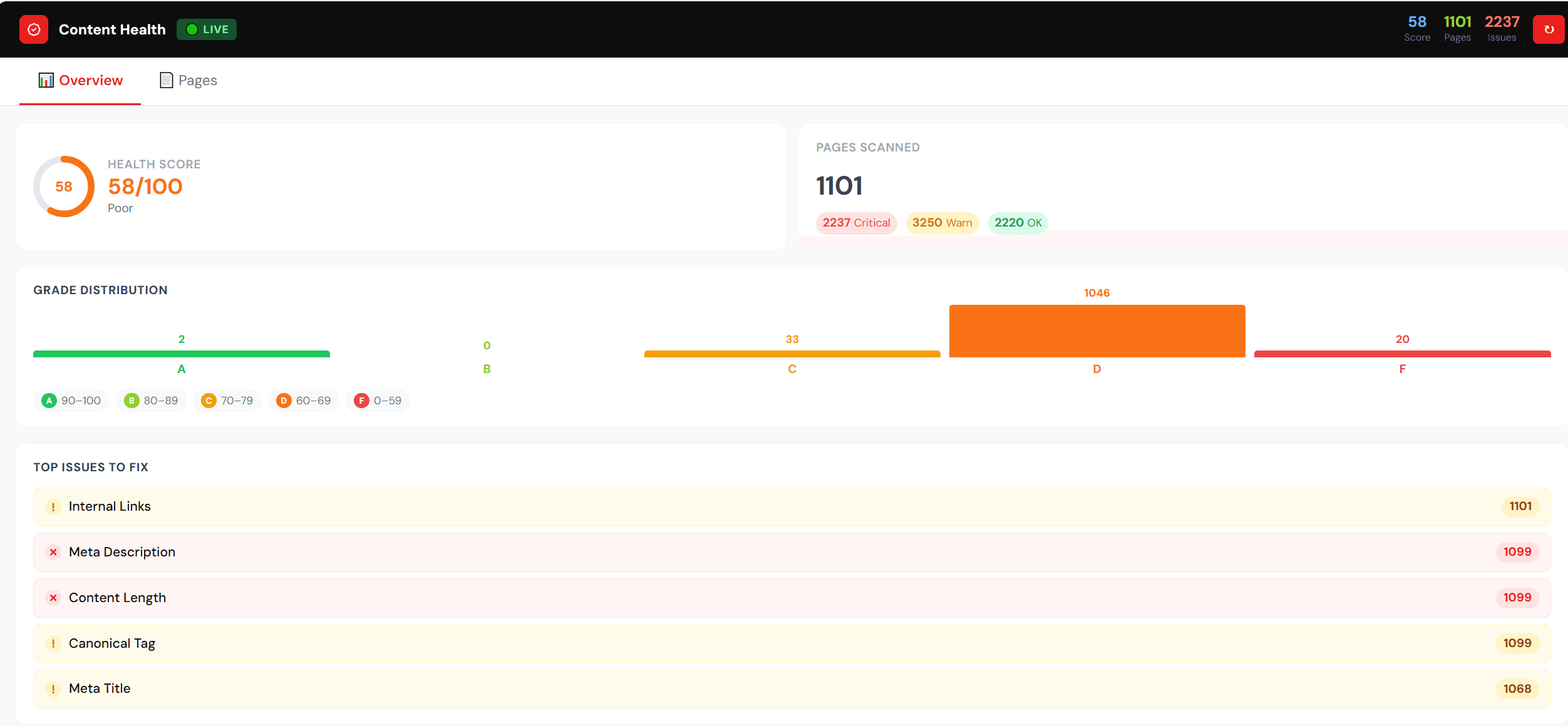
Every page is scored across seven checks, each weighted by its importance to SEO and accessibility:
- Meta Title — is it present, and is it 50–60 characters long for search snippets?
- Meta Description — is it present and within the 150–160 character SERP-friendly range?
- H1 Heading — does the page have a clear main heading telling search engines what it is about?
- Image Alt Text — do all images carry descriptive text for screen readers and image SEO?
- Content Length — does the page have at least 300 words, enough to rank meaningfully?
- Canonical Tag — is the canonical URL field set to prevent duplicate-content penalties?
- Internal Links — are there at least three internal links helping search engines discover your structure?
How the Score Is Calculated
Each page receives a final score from 0 to 100, mapped to a familiar letter grade. Grade A (90–100) means the page is excellent and well optimized. Grade B (75–89) is good, with only minor improvements possible. Grade C (60–74) needs attention and has several issues to fix. Grade D (40–59) is poor with significant gaps, and Grade F (0–39) signals critical problems affecting search visibility. This dual model a precise number plus an instantly readable grade works equally well for daily editing and for formal audits.
Performance Radar and Detailed Analysis
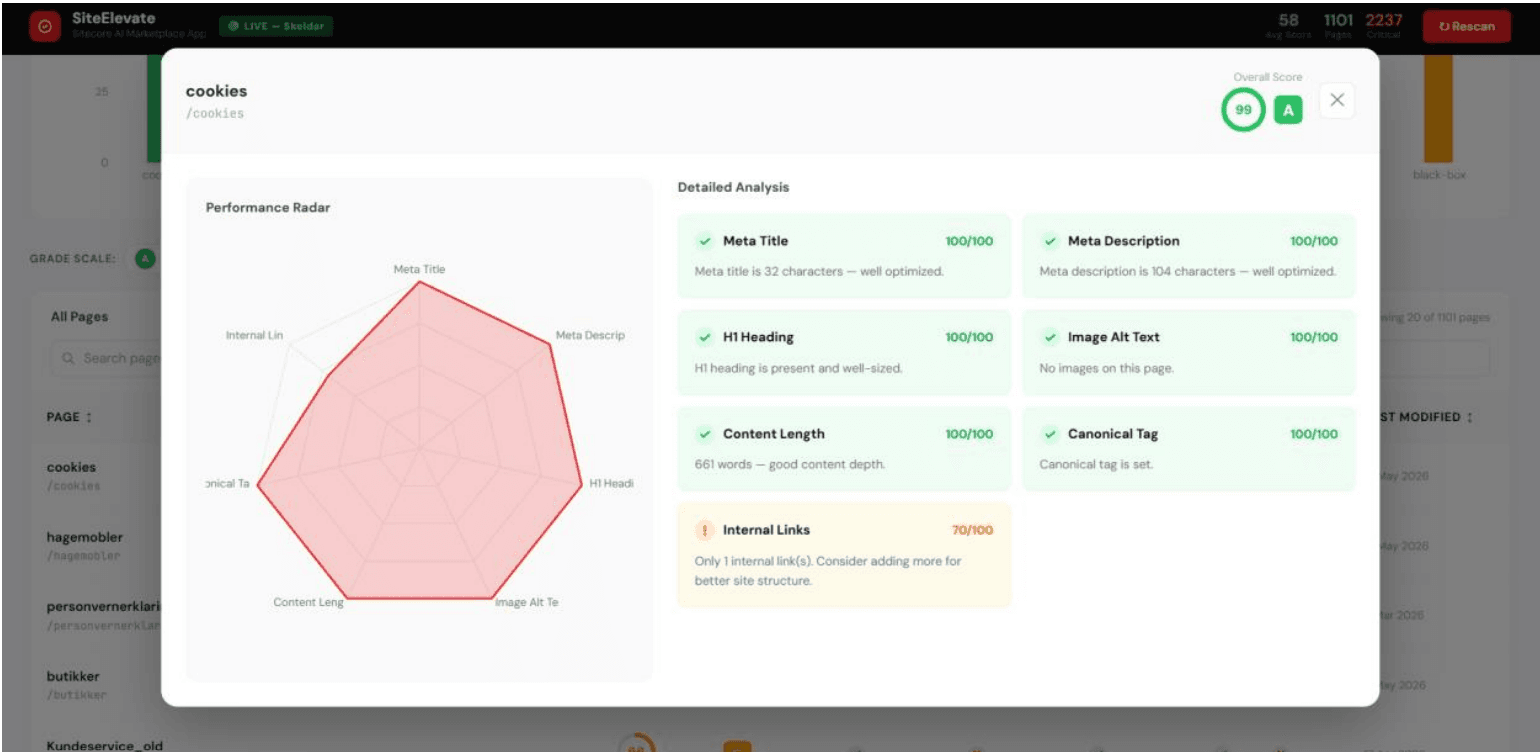
Click any page in the dashboard and a detail popup opens with two powerful views side by side. The Performance Radar Chart is a spider chart showing scores across all seven checks at once - its shape immediately reveals which checks are strong and which need attention. The Detailed Analysis Grid shows each of the seven checks as a colour-coded card with its score out of 100 and a plain-English explanation of what is passing, what is a warning, and what is critical to fix.
How to Use It in Your Day
A content editor opens a page in Page Builder as they normally would, glances at the Content Health panel in the left sidebar, expands any red or yellow check to see what is missing, fixes the issue in the Content tab, then clicks Rescan to confirm the score has improved.
A marketing manager opens SitecoreAI, scans the Overview tab for the site-wide score, jumps to “Top Issues to Fix” to see the problems affecting the most pages, and shares the priority list with their content team.
An SEO specialist launches the Standalone Full Dashboard from the Apps menu, filters the table to Grade D and F pages, clicks into each to see the full breakdown, fixes them, and runs Rescan to track improvement over time.
Why It Matters
- Works inside Sitecore — no external SEO tools, no exports, no context switching.
- Real-time live data — every score reflects the actual current state of your content, refreshable on demand with Rescan.
- Find issues you didn’t know existed — scan 100, 500, or 1,000+ pages at once and surface problems in seconds.
- Works for everyone — simple enough for content editors daily, detailed enough for formal SEO audits.
- All depth levels covered — including deeply nested child pages like account sections, product subcategories, and landing pages.
- Custom Marketplace app — install once and it is available for every team member in your organisation instantly.
Getting Started
The SiteElevate is available as a custom Marketplace app for your Sitecore Environment. Log in to portal.sitecorecloud.io, find the app on the home screen under “Apps”, and click the SiteElevate icon to open the full audit view. Navigate to SitecoreAI to use the Overview and Pages tabs as a widget and open any page in Sitecore AI Page Builder to see the Content Health panel appear automatically in the left sidebar. After fixing any content issue, click Rescan to refresh the scores instantly and confirm the improvement.
Start Improving Your Content Health Today
Great Sitecore sites are not built in a single push they are kept healthy, page by page, every week. The SiteElevate makes that work visible, measurable, and shared across the whole team, right where the work already happens. Start with the Overview tab for a quick picture of your site, use the Critical filter to focus on what matters most, and aim to eliminate every Grade F page first those have the largest impact on your search visibility.
Ready to see your site’s real content health score? Contact us to bring the SiteElevate service to your Sitecore AI environment and run your first scan in minutes no setup, no exports, no guesswork.

Keyur Nayi- Technical lead - ADDACT
Technical lead - ADDACT
Keyur is a Technical Lead at Addact with 9+ years of experience in enterprise CMS and software engineering. He is certified in Sitecore XM Cloud, OrderCloud, Sitecore 10 .NET, and SitecoreAI CMS for Developers (2025), specializing in scalable, cloud-ready and AI-driven implementations.
His technical stack includes ASP.NET/Core, C#, MVC, jQuery, and Azure/AWS, enabling high-performance, cross-platform digital solutions.