
How to restrict value type from field by custom rule validation?
Published: 11 September 2023
In one of my projects, I needed to restrict my image field with no SVG type images or just add jpg/png type images only.
For this kind of validation, we cannot write Sitecore rules over the fields or in the standard templates. We need to write our own validation method by inheriting the StandardValidator method.
Below are the steps for the custom rule for the restrict type field in the image field.
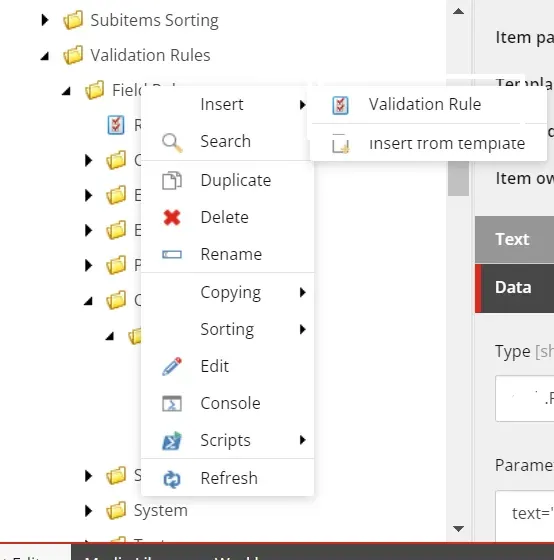
Step-1: Go to the path “/sitecore/system/Settings/Validation Rules/Field Rules/” in the sitecore and create one item by right click with the “Validation Rule” template.
Step-2: Create one validation in your project repository and add the below code into it.
public class ImageTypeValidation: StandardValidator
{
    public ImageTypeValidation():base() { }
    public ImageTypeValidation(SerializationInfo info, StreamingContext context)
        : base(info, context)
    {
    }
    public override string Name { get; }
    protected override ValidatorResult Evaluate()
    {
        Field field = this.GetField();
        if (field == null)
            return ValidatorResult.Valid;
        if (string.IsNullOrEmpty(field.Value))
            return ValidatorResult.Valid;
        Sitecore.Data.Items.MediaItem mediaItem = null;
        Database database = Factory.GetDatabase(ItemUri.DatabaseName);
        if (field.InheritedValue.Contains("mediaid"))
        {
            Sitecore.Data.Fields.XmlField fileField = field;
            Sitecore.Data.ID mediaID = Sitecore.Data.ID.Parse(fileField.GetAttribute("mediaid"));
            mediaItem = database.GetItem(mediaID);
        }
        else
        {
            mediaItem = database.GetItem("/sitecore/media library" + field.InheritedValue);
        }
        if (mediaItem == null)
            return ValidatorResult.Valid;
        if (mediaItem.Extension.ToLower()=="png" || mediaItem.Extension.ToLower() == "jpg")
            return ValidatorResult.Valid;
        if (string.IsNullOrEmpty(this.Parameters["text"]))
            this.Text = "We support only png and jpg";
        else
            this.Text = this.Parameters["text"];
            return base.GetFailedResult(ValidatorResult.CriticalError);
    }
    protected override ValidatorResult GetMaxValidatorResult()
    {
        throw new NotImplementedException();
    }
}
Step-3: Give namespace into custom validator in type field and add text parameter in parameter field as per the below screenshot. By this text parameter, we can show the content editor to show a custom error.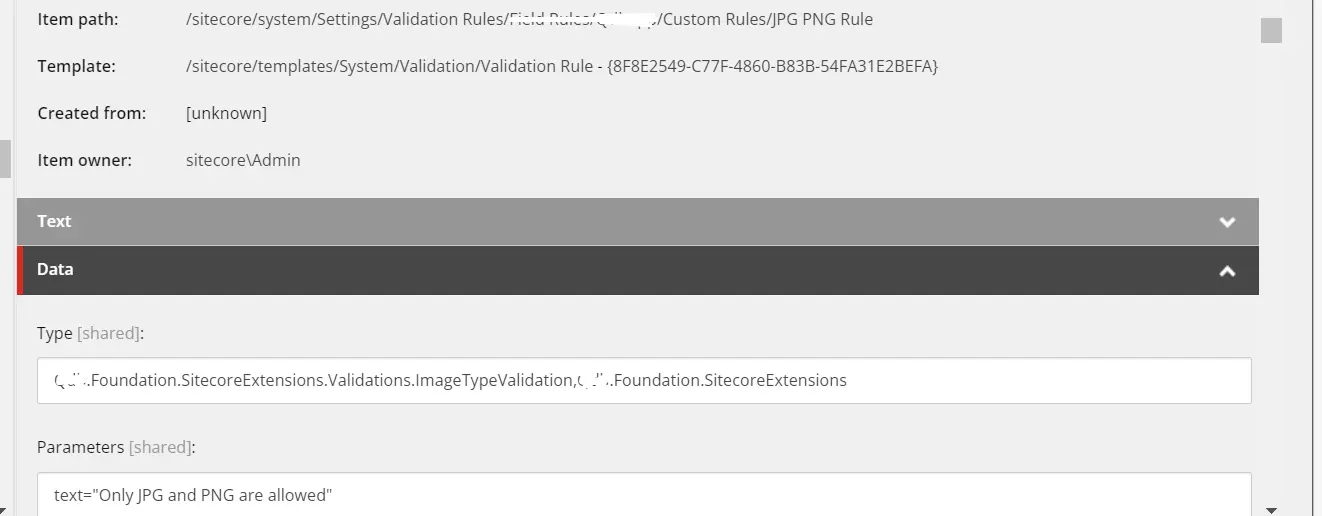
Step-4: Add this rule into image field or your targeted field.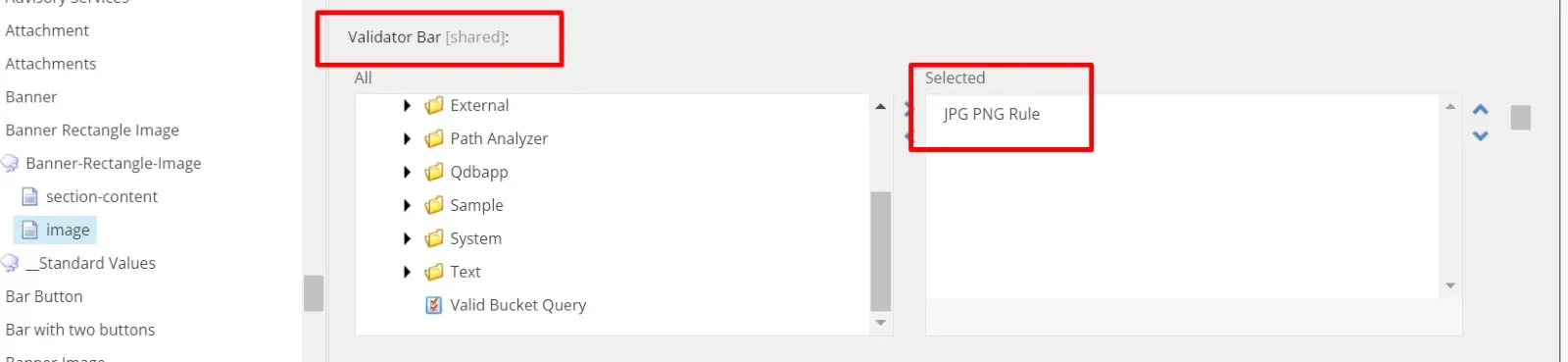
Now I created an item and when we add an SVG image in the image field then it will show us the error message as below.

Maulik Dudharejia - Co-Founder & GGO | ADDACT
Sitecore MVP 3X || Digital Transformation Strategist || Marketer
As Chief Growth Officer at Addact, he drives business growth, digital transformation, and strategic innovation initiatives. With over 12 years of experience in technology consulting, digital experience platforms, and enterprise solutions, he helps organizations accelerate their digital journey through modern CMS, AI-powered experiences, and customer-centric growth strategies. His focus is on creating scalable business value, strengthening partnerships, and enabling long-term client success.