Solving “Created Date” Filtering in Sitecore GraphQL (Without __created)
Published: 31 March 2026

Introduction
The problem that looks simple, until it isn’t
Every Sitecore developer encounters this requirement sooner or later:
“Fetch the latest child items based on their created date.”
Sounds straightforward, right?
If you are working with Sitecore AI and GraphQL, you might instinctively try to use the system field __created.
However, when you attempt to use __created inside a GraphQL search query, you quickly realize:
It is not supported for filtering or sorting.
There are no explicit errors or warnings; it simply does not return the expected results.
Below is the response I received from the Experience Edge GraphQL endpoint.
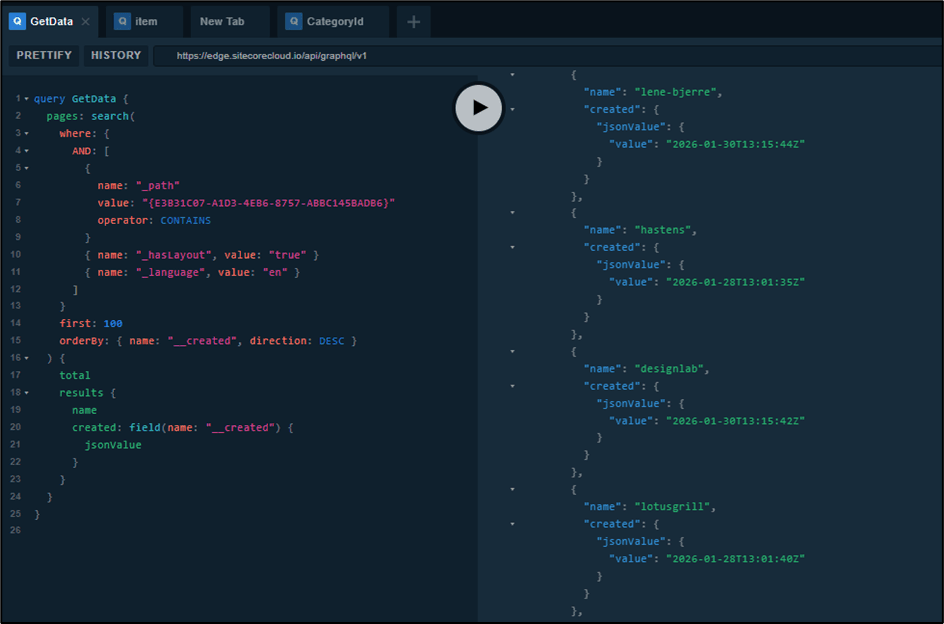
At first glance, everything appears correct. The data loads successfully, and no query errors are reported. However, upon closer inspection, something is clearly inconsistent.
Even though the query explicitly applies sorting on __created, the returned items are not ordered in descending sequence based on their created date.
In other words, the sorting condition exists, but it is not actually respected in the output.
This is where confusion begins. Technically, nothing is failing, yet the results do not align with expectations.
The idea: make “created date” a first-class content field
If GraphQL can’t query __created, why not expose the created date ourselves?
The solution in one sentence:
Add a custom Date field, auto-populate it using $now, and query against it in GraphQL.
This blog walks through:
• Why this limitation hurts real-world use cases
• The workaround I implemented
• How a simple custom field + $now token solves it cleanly
• A working GraphQL query you can use today
Another real-world scenario
I was building a Recent Case Studies feed.
Requirements:
• Fetch child items under a parent
• Show the latest items first
• No custom backend logic (pure content + query)
What didn’t work:
• Sorting by __created
• Filtering by __created
• Any search query relying on system metadata
GraphQL in Sitecore AI is powerful, but intentionally limited when it comes to system fields.
So instead of fighting it, I leaned into a content-first solution.
The idea: make “created date” a first-class content field
If GraphQL can’t query __created, why not expose the created date ourselves?
The solution in one sentence:
Add a custom Date field, auto-populate it using $now, and query against it in GraphQL.
Step 1: Add a custom date field
I added a new field to my template:
Field name:
“caseStudyCreatedDate”
Field type:
Datetime
This field represents the “effective created date” of the item from a GraphQL perspective.
Step 2: Use $now as a Standard Value
To avoid relying on content authors to manually set dates, I used Standard Values.
Standard Value:
$now
This ensures:
• Every new item automatically gets the current date
• No manual effort
• Consistent data across all items

Step 3: Add Help Text (This Step Is Critical)
Content editors will eventually have questions, so I added clear and intentional help text:
“Created date is added by default. Update this only if you want this article to appear in the recent feed.”
This small addition significantly improves content governance.
Why this matters:
- Editors understand the purpose of the field
- They know when to modify it and when to leave it unchanged
- It reduces repeated explanations and future confusion
Step 4: Querying in GraphQL
Now comes the key benefit.
GraphQL search works reliably with custom fields.
Here is a simplified example query:
query LatestCaseStudies {

  search(
    where: {
      AND: [
        {
          name: "_path"
          value: "{GUID}"
          operator: CONTAINS
        }
        { name: "_hasLayout", value: "true" }
      ]
    }
    orderBy: { name: "caseStudyCreatedDate", direction: DESC }
    first: 3
  ) {
    results {
      name
    }
  }
}
Why This Approach Works So Well
- Date fields are fully supported in GraphQL search
- Sorting behaves consistently and predictably
- Filtering is accurate and reliable
- There is no dependency on restricted system metadata
Bonus: Why This Is Better Than Using __created
Even if Sitecore introduces support for __created in the future, this approach remains superior.
Advantages include:
- Editors gain control over content visibility
- Content can be backdated or scheduled strategically
- Behavior remains consistent across environments
What initially appears to be a workaround actually results in a more flexible and scalable content model.
Final Thoughts
This problem started with a limitation:
“Why can’t I filter by __created in GraphQL?”
But it led to a better architectural approach.
Key takeaways:
- GraphQL performs best with explicit, queryable content fields
- Standard Values combined with $now provide powerful automation
- Sometimes the optimal solution is to align with platform constraints rather than fight them
In the end, this approach delivers cleaner architecture, better control, and improved reliability.

Keyur Nayi- Technical lead - ADDACT
Technical lead - ADDACT
Keyur is a Technical Lead at Addact with 9+ years of experience in enterprise CMS and software engineering. He is certified in Sitecore XM Cloud, OrderCloud, Sitecore 10 .NET, and SitecoreAI CMS for Developers (2025), specializing in scalable, cloud-ready and AI-driven implementations.
His technical stack includes ASP.NET/Core, C#, MVC, jQuery, and Azure/AWS, enabling high-performance, cross-platform digital solutions.