
Extending Sitecore Content Hub with External Components
Published: 22 July 2026

Introduction
Modern enterprise applications rarely operate in isolation. Organizations often extend Sitecore Content Hub by integrating it with external systems such as CMS platforms, DAM solutions, translation services, analytics tools, or internal business applications. External Components provide a flexible way to bring these integrations directly into the Content Hub user interface, enabling users to interact with external data without leaving the platform.
While building an External Component is relatively straightforward, making it reusable across multiple environments is where many implementations encounter challenges.
What You'll Learn
In this article, we'll explore:
- How External Components work in Content Hub.
- Why configurable integrations are considered a best practice.
- How to externalize environment-specific settings.
- Best practices for building reusable and maintainable integrations.
- A real-world example and advanced considerations.
Building a Configurable External Component: Understanding the Architecture
An External Component is a custom JavaScript application that can be embedded into a Content Hub page. Instead of extending the platform through backend customizations, it enables developers to add interactive functionality directly within the user interface.
A typical integration follows this architecture:
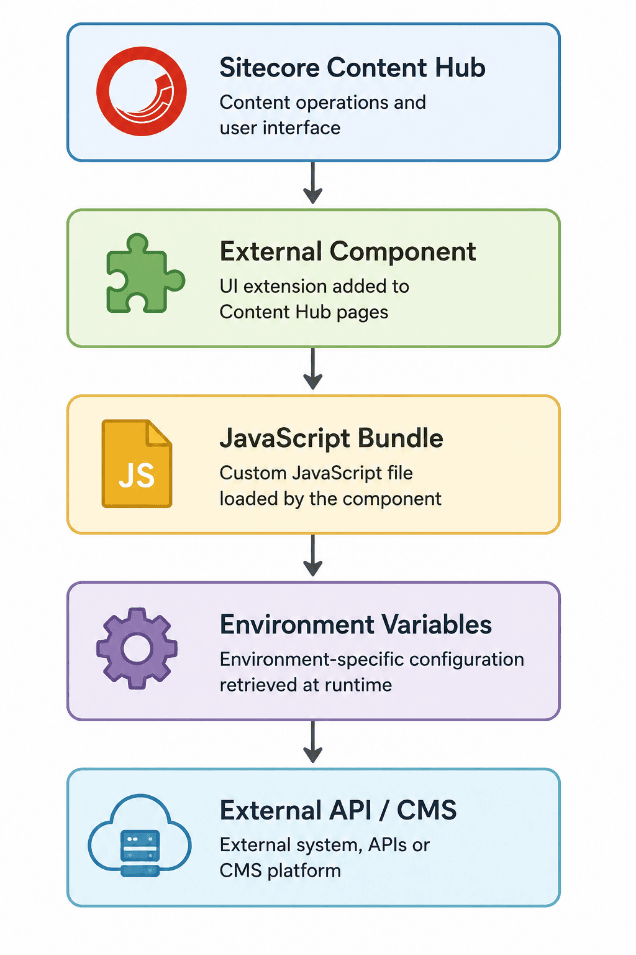
The responsibility of each layer is straightforward:
| Component | Responsibility |
|---|---|
| Sitecore Content Hub | Hosts the External Component within the UI. |
| External Component | Renders the custom interface and handles user interaction. |
| JavaScript Bundle | Contains the business logic for the integration. |
| Environment Variables | Stores configurable values such as URLs or API settings. |
| External API / CMS | Provides the required data or services. |
This layered approach ensures that each part of the solution has a clear responsibility, making the integration easier to maintain and extend.
Hosting the JavaScript Bundle
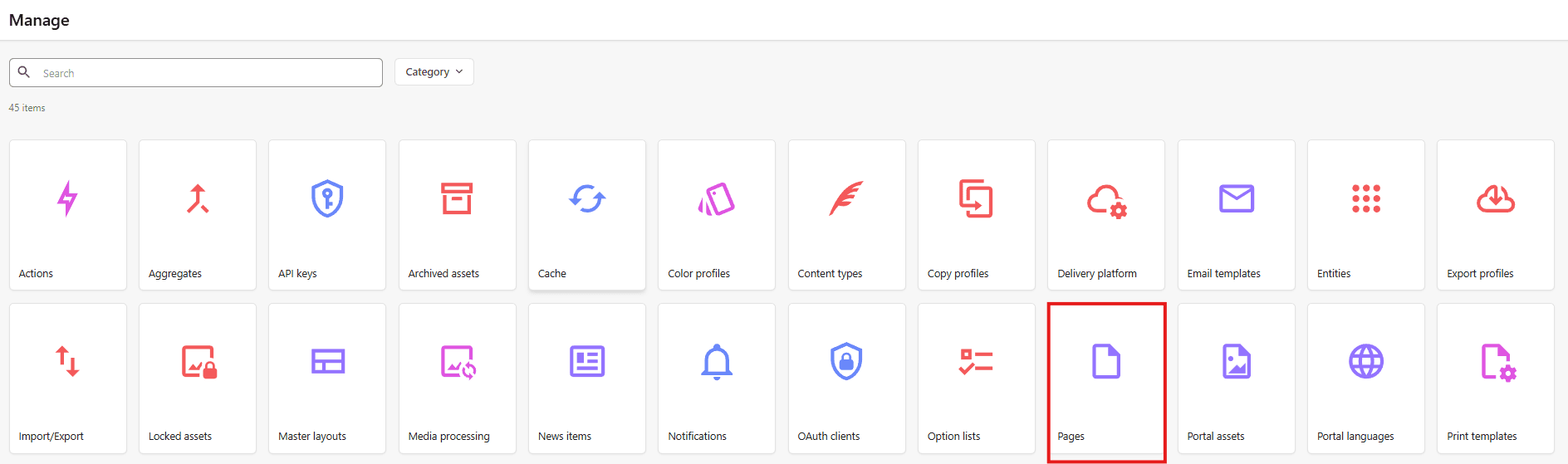
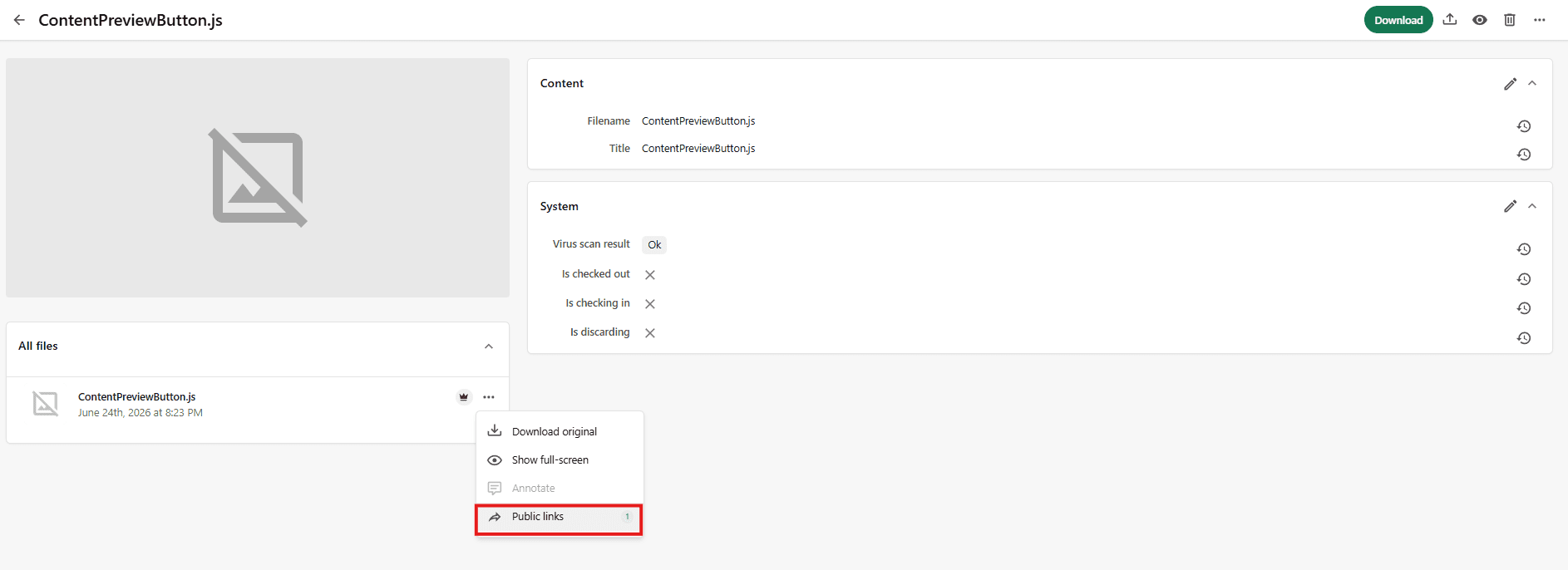
Once the component is developed, the JavaScript bundle is uploaded as a portal asset and referenced by the External Component using its public URL. This allows Content Hub to load the latest version of the application whenever the page is opened.
Avoid Hardcoded Configuration
One of the biggest mistakes when developing External Components is embedding configuration directly into the code.
For example:
const cmsUrl = "https://dev.company.com";
const apiUrl = "https://api.dev.company.com";
Although this works during development, it creates additional work whenever the solution is deployed to another environment.
Instead, store these values as environment variables and read them at runtime.
For example:
const environmentSettings = await context.client.settings.getSettingValueAndSchemaAsync(
    'PortalConfiguration',
    'EnvironmentVariables'
);

const environmentVariables = JSON.parse(environmentSettings?.value || '{}');
const baseUrl = environmentVariables.CMSBaseUrl;
This approach allows the same JavaScript bundle to be deployed across Development, QA, UAT, and Production without requiring any code changes.
Why Environment Variables Matter
Environment variables provide a centralized location for managing deployment-specific settings. Instead of rebuilding the application for every environment, only the configuration needs to change.
Typical values stored as environment variables include:
- CMS Base URL.
- API Base URL.
- Feature flags.
- Authentication settings.
- Timeout values.
- Application identifiers.
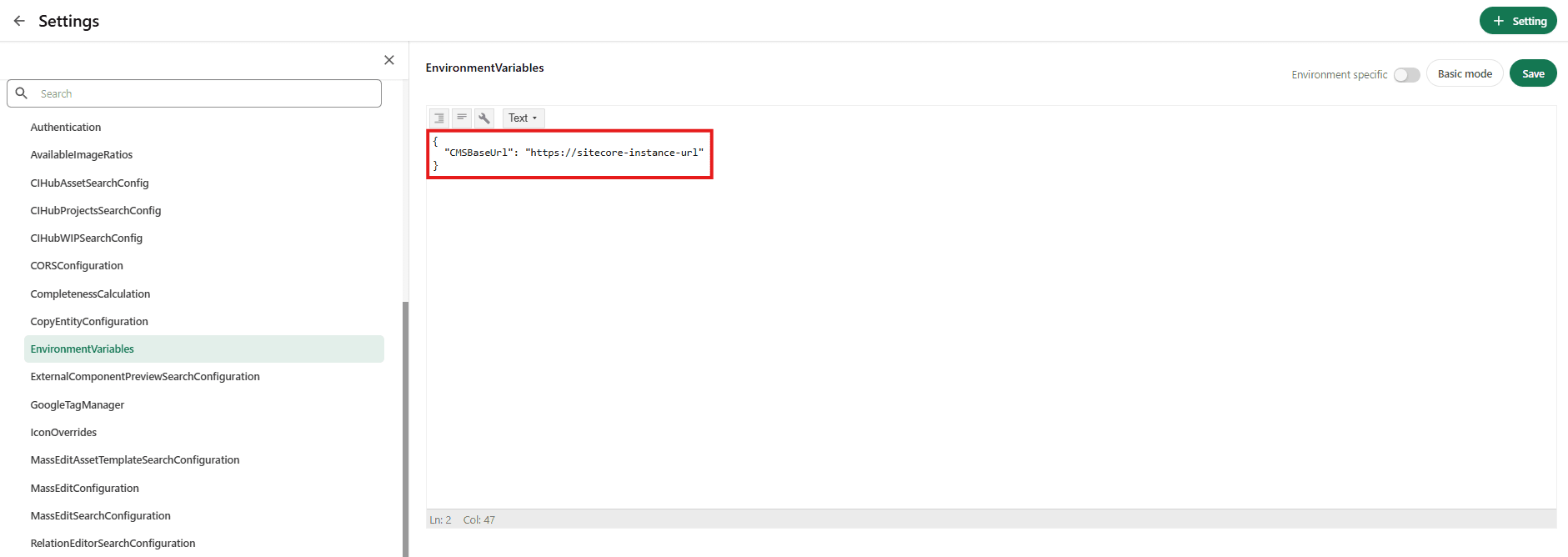
In the reference implementation, a JSON environment variable is created to store the CMS base URL, allowing the External Component to dynamically determine the correct endpoint based on the current environment.
Benefits of a Configurable Integration
Moving configuration outside the application provides several long-term advantages:
- A single JavaScript bundle can be reused across all environments.
- Deployment becomes configuration-driven instead of code-driven.
- Environment-specific values can be updated without rebuilding the application.
- Maintenance effort is significantly reduced.
- The same architectural pattern can be reused for multiple integrations.
By separating configuration from business logic, External Components become easier to deploy, maintain, and extend as business requirements evolve.
Best Practices for Production-Ready External Components
Building an External Component is only the first step. To ensure it remains reliable and maintainable over time, it should be designed with scalability, configuration, and operational resilience in mind. Following a few best practices during development can significantly reduce maintenance effort and simplify future enhancements.
- Keep configuration separate from business logic.
- Build components that can be reused.
- Validate configuration before execution.
- Implement proper error handling.
- Keep the JavaScript bundle lightweight.
Conclusion
External Components provide a powerful mechanism for extending Sitecore Content Hub and integrating external systems directly into the authoring experience. However, the long-term success of these integrations depends on thoughtful architecture rather than implementation alone.
By separating configuration from business logic, leveraging environment variables, validating runtime settings, and designing reusable components, teams can build integrations that are easier to deploy, simpler to maintain, and adaptable to changing business requirements.
Whether you're integrating a CMS, DAM, translation service, or any external application, adopting these best practices will help you create production-ready External Components that can be reused across multiple environments with minimal effort.
Real-World Example and Advanced Considerations
Up to this point, we've discussed the architecture and best practices for building configurable External Components. Let's see how these concepts come together in a real-world scenario.
Example: Building a Preview Integration
Suppose your organization wants content authors to preview content before it is published to the live website. Instead of embedding preview logic directly into Content Hub, you can create an External Component that retrieves the current entity, constructs a preview URL, and opens the preview application.
The workflow would look like this:
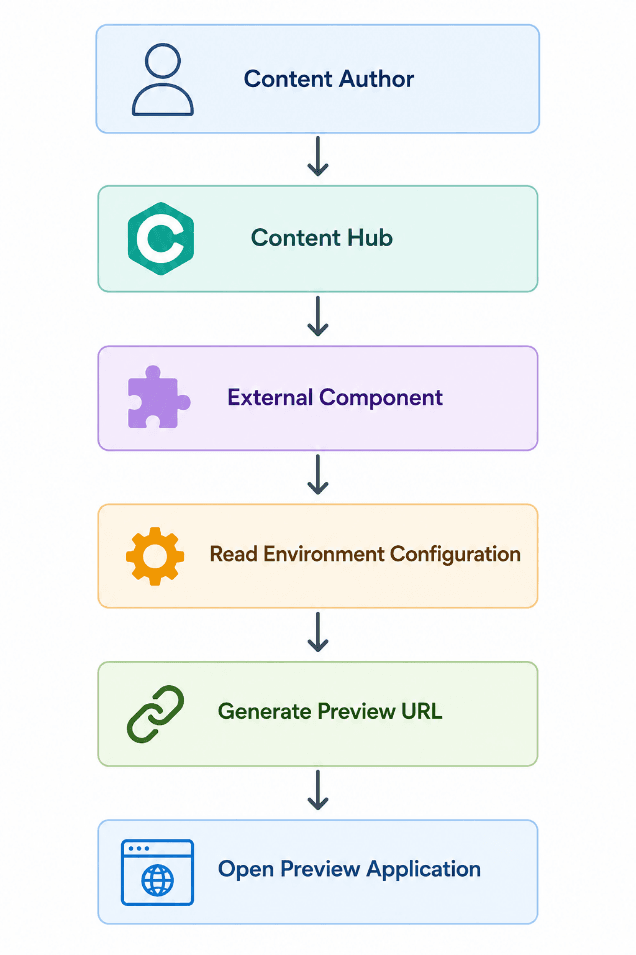
By keeping the preview application's base URL in an environment variable, the same component can operate across Development, QA, UAT, and Production without requiring any code changes. Your reference implementation follows this approach by configuring the CMS base URL as an environment variable and using it within the External Component.
Production Checklist
Before deploying an External Component, verify the following:
- Environment variables are configured correctly.
- The JavaScript bundle is uploaded to Portal Assets.
- The bundle URL is accessible.
- API endpoints are secured.
- Error handling and logging are implemented.
- Configuration is validated before execution.
Following this checklist helps reduce deployment issues and ensures a smoother rollout.
Final Thoughts
External Components are more than UI extensions; they are integration points between Content Hub and external systems. Designing them with configuration, reusability, and maintainability in mind ensures they continue to support evolving business requirements without frequent code changes.
As enterprise solutions grow, adopting these practices early will simplify deployments, reduce maintenance effort, and provide a consistent experience across all environments.

Vikesh Bhavsar
Senior Software Engineer – SitecoreAI & SXA
Vikesh is a Sitecore professional at Addact with 4 years of experience, specializing in SitecoreAI, Sitecore XP, SXA, Headless JSS, and ASP.NET MVC. He focuses on building scalable, performance-driven CMS solutions and Sitecore Page Builder compatible components for personalized digital experiences.