
Supercharging SitecoreAI with Custom LLMs(Gemini or OpenAI)
Published: 30 April 2026
Supercharging SitecoreAI with Custom LLMs(Gemini or OpenAI)
When enterprises adopt SitecoreAI (XM Cloud), they often begin by leveraging built-in generative features to assist content authors. These capabilities are powerful but for advanced engineering teams, out-of-the-box AI is only the starting point.
What if your organization must enforce strict data residency and route all prompts through a private Azure OpenAI instance?
What if you want to use Gemini 1.5 Pro to analyze long-form documents and automatically generate structured Sitecore components?
What if you need enforceable, enterprise-grade system prompts and governance beyond what the default UI allows?
The answer is simple: you don’t wait for vendor support—you extend the platform.
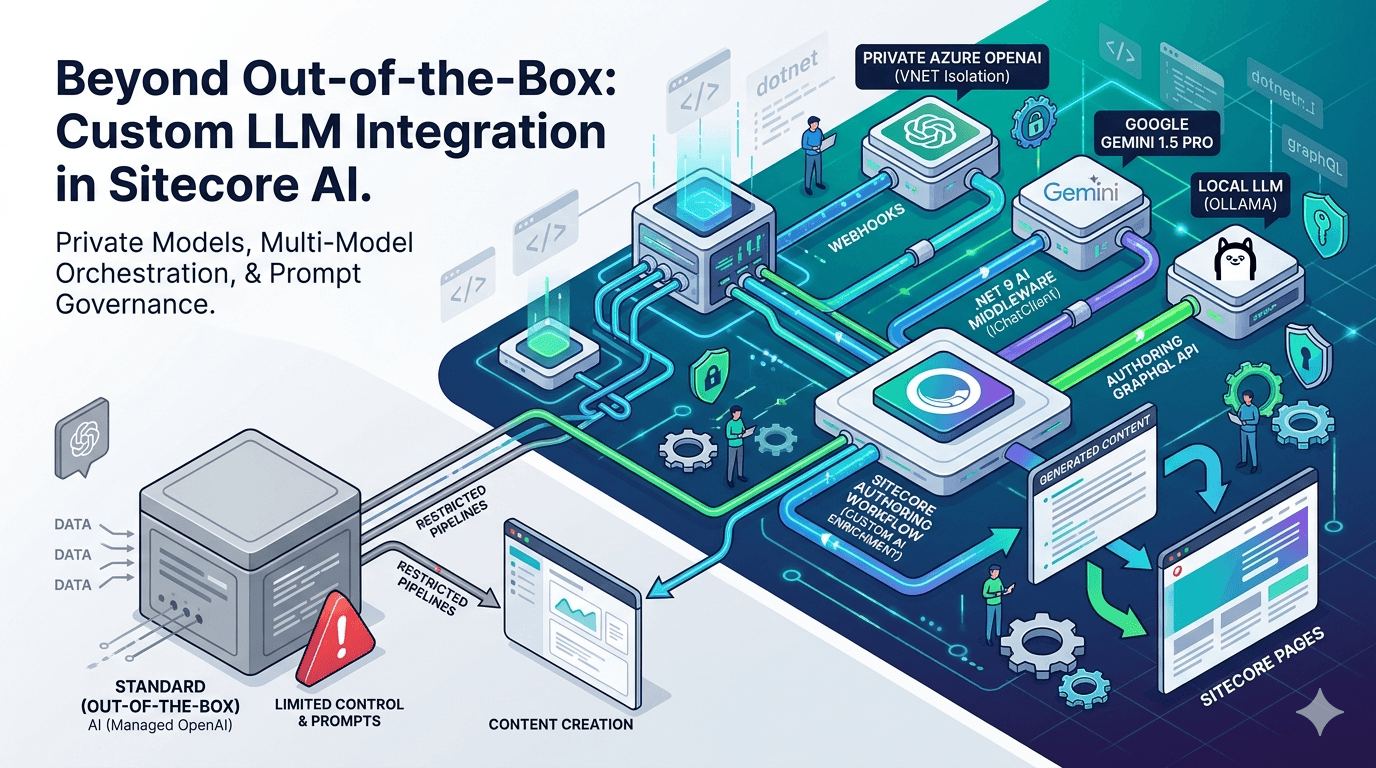
By leveraging event-driven architecture, webhooks, the Authoring API, and modern .NET, you can build a custom LLM pipeline directly into your Sitecore AI workflows.
While Sitecore AI provides foundational AI capabilities, advanced pipelines like this are implemented using external services and integrations to meet enterprise requirements.
Moving Beyond Built-In AI
Built-in AI features are excellent for:
Draft content generation
Basic summarization
Author assistance
But real enterprise requirements demand more:
Private model hosting (Azure OpenAI with VNET isolation)
Multi-model orchestration (Gemini, OpenAI, local LLMs)
Strict prompt governance and auditability
Automated enrichment pipelines
Compliance, observability, and cost control
To achieve this, we must move from UI-driven AI → event-driven AI systems.
The Architecture: Event-Driven GenAI in Sitecore AI
To maintain a secure and scalable architecture, we must avoid:
Direct frontend → LLM communication
Exposing API keys in UI layers
Tight coupling between CMS and AI providers
Instead, we introduce a Backend-for-Frontend (BFF) / Microservice layer triggered via Sitecore AI events.
High-Level Flow
Author (Sitecore AI)
│
▼
Webhook Event (item saved / workflow)
│
▼
API Layer (.NET Core)
│
▼
Queue (Azure Service Bus / Kafka) ← Recommended for production
│
▼
AI Worker Service
│
▼
LLM (Azure OpenAI / Gemini)
│
▼
Sitecore Authoring API (Write-back)
ˇ💡 In production systems, introducing a queue layer is critical for reliability, scalability, and cost control.
The Execution Flow
1. The Trigger
A content author creates or updates content OR transitions an item into a workflow state like “AI Enrichment”
2. The Webhook
Sitecore AI emits an event (e.g., item:saved) and sends payload data to your backend.
📌 Note: Webhook behavior depends on your Sitecore AI configuration and integration setup.
3. The Queue (Production Best Practice)
Instead of calling the LLM synchronously:
Push the event into a queue:
Azure Service Bus
Kafka
RabbitMQ
This ensures:
Resilience against failures
Retry capability
Protection from LLM rate limits
4. The AI Orchestration Layer
A .NET Core service:
Extracts content
Applies strict prompt templates
Selects the appropriate model
Handles retries and validation
5. LLM Processing
Supports multiple models:
Azure OpenAI (enterprise standard)
Gemini (custom integration)
Future or local models
⚠️ Gemini integration requires a custom client and is not natively provided by Sitecore AI.
6. Write-Back to Sitecore AI
Using Authoring/Management APIs:
Update fields like:
SEO Title
Meta Description
Tags
Implementation Guide
Step 1: Configure the AI Service
using Microsoft.Extensions.AI;
using Azure.AI.OpenAI;

var builder = WebApplication.CreateBuilder(args);

builder.Services.AddChatClient(new AzureOpenAIClient(
    new Uri(builder.Configuration["AzureOpenAI:Endpoint"]),
    new System.ClientModel.ApiKeyCredential(builder.Configuration["AzureOpenAI:Key"])
).AsChatClient("gpt-4o"));

Optional (Gemini swap):

// Requires custom implementation
// builder.Services.AddChatClient(new GeminiChatClient(apiKey, "gemini-1.5-pro"));
💡 Microsoft.Extensions.AI is an emerging abstraction layer that enables model-agnostic design.
Step 2: Webhook Receiver Endpoint
[HttpPost("generate-seo")]
public async Task<IActionResult> GenerateSeoMetadata([FromBody] SitecoreWebhookPayload payload)
{
    var articleBody = payload.Item.Fields
        .FirstOrDefault(f => f.Name == "Body")?.Value;

    if (string.IsNullOrEmpty(articleBody)) return Ok();

    var prompt = $@"
        You are an expert SEO specialist.
        Generate JSON:
        - seoTitle (max 60 chars)
        - metaDescription (max 155 chars)

        Content:
        {articleBody}
    ";

    var aiResponse = await _chatClient.CompleteAsync(prompt);

    // ⚠️ Always validate AI output in production
    var metadata = JsonSerializer.Deserialize<SeoMetadata>(aiResponse.Message.Text);

    await _graphClient.UpdateItemFieldsAsync(payload.Item.Id, new
    {
        SeoTitle = metadata.SeoTitle,
        MetaDescription = metadata.MetaDescription
    });

    return Ok();
}
⚠️ Production systems must include validation, retry logic, and fallback handling for AI responses.
Step 3: Configure Webhook in Sitecore AI
Event: item:saved or workflow-triggered
Endpoint: https://your-api.com/api/webhooks/sitecore/generate-seo
Add:
Authorization headers
Secret validation
Enterprise Considerations (Critical)
Retry & Resilience
Handle LLM failures
Use exponential backoff
Avoid blocking authoring flow
Security
Validate webhook signatures
Store secrets securely (Key Vault)
Avoid exposing API keys
Observability
Logging (Serilog / App Insights)
Distributed tracing (OpenTelemetry)
Prompt/response auditing
Cost Control
Track token usage
Cache repeated prompts
Optimize prompt size
Idempotency
Prevent duplicate processing:
if (AlreadyProcessed(payload.Item.Id))
return Ok();
Why Enterprises Choose This Approach
1. Data Residency & Compliance
Route all AI traffic through controlled infrastructure (e.g., private Azure OpenAI).
2. Model Flexibility
Switch between models without CMS changes.
3. Advanced AI Workflows enable:
Content enrichment
Translation
Brand compliance
Multi-step agent pipelines
4. True Decoupling
Sitecore AI becomes:
A composable content platform within a broader AI ecosystem not a limitation.
Final Verdict
Sitecore AI is not limited to built-in AI features.
By combining:
Event-driven architecture
External AI orchestration
Authoring API integration
You can transform it into:
A powerful, enterprise-grade AI orchestration layer
This approach ensures:
Scalability
Security
Flexibility
Future-proof AI integration
Closing Thought
The real power of Sitecore AI is not in what it provides out-of-the-box It’s in how far you can extend it.
References

Roshan Ravaliya
Software Developer – Sitecore & .NET
Roshan is a Sitecore and .NET developer at Addact, specializing in Sitecore XM Cloud, Sitecore XP, and SitecoreAI-driven implementations. He works with .NET Core, C#, Azure Functions, and Next.js to deliver scalable, cloud-enabled, and performance-focused digital solutions.