
Bulk Updating Items in Sitecore Content Hub via API: A Scalable Approach
Published: 16 June 2026
The Operational Challenge in Modern Content Platforms
Managing content at scale is no longer optional. Organizations using Sitecore Content Hub often deal with thousands of content entities across multiple workflows. While the platform provides a powerful UI, it is not designed for high-volume repetitive updates.
A common scenario illustrates the problem clearly: you need to move hundreds of items from one lifecycle state to another, such as from “Final” to “In Progress.” Performing this manually becomes inefficient and introduces risk.
Defining the Problem
Bulk updates in Content Hub are challenging because:
- The UI requires manual interaction for each item.
- Lifecycle states are not simple fields but relational data.
- There is no built-in bulk-edit capability for certain operations.
- Manual updates increase the likelihood of inconsistent data.
Real-World Impact
Without an automated approach:
- Content updates take hours instead of minutes.
- Errors in lifecycle transitions become common.
- Release timelines are delayed.
- Operational costs increase.
A Better Way Forward
The solution lies in leveraging the Content Hub API to automate bulk operations. By programmatically interacting with entities and their relations, teams can:
- Execute updates at scale.
- Maintain consistency across items.
- Add validation and safety checks.
- Build reusable automation workflows.
In the following sections, we will break down how bulk updates work, analyse the structure of such a solution, and walk through a practical implementation with extensibility in mind.
Why Bulk Updates Are More Complex Than They Appear
At a surface level, updating content seems straightforward. However, in Content Hub, data is structured in a way that introduces additional complexity.
Each content item consists of:
- Entity: The core content object.
- Properties: Fields such as name, description, and metadata.
- Relations: Links to other entities such as lifecycle, taxonomy, or ownership.
The Key Insight: Lifecycle Is a Relation
Lifecycle states are not stored as simple fields. Instead, they are maintained through a relation.
Content Entity → ContentLifeCycleToContent → Lifecycle Entity
This means updating the lifecycle requires modifying a relationship rather than updating a property.
Typical Bulk Update Flow
A robust bulk update process generally follows these steps:
- Authenticate with the API.
- Iterate through target entities.
- Fetch entity details.
- Identify the current lifecycle state.
- Validate whether an update is required.
- Update the relation.
- Log results.
Configuration Setup
Below is a simplified configuration structure:
$baseUrl = "{URL}"
$clientId = "{Client ID}"
$clientSecret = "{Client Secret}"

$entityIds = @(
    "1774711",
    "1774709",
    "1773768"
)
Explanation
- Base URL defines the Content Hub instance.
- Client credentials provide secure API access.
- Entity IDs represent the items to process.
Safe Execution with Dry-Run Mode
$whatIf = $false
This flag determines whether the script performs actual updates or only simulates them.
When enabled:
- No data changes are made.
- Output shows what would have been updated.
- Useful for validation before execution.
Implementation Breakdown
Step 1: Authentication
Authentication is performed using the OAuth2 client credentials flow.
$response = Invoke-RestMethod -Uri "$BaseUrl/oauth/token" -Method POST `
    -ContentType "application/x-www-form-urlencoded" `
    -Body @{
        grant_type    = "client_credentials"
        client_id     = $ClientId
        client_secret = $ClientSecret
    }
It securely retrieves an access token, which is then used for all API requests. This approach avoids embedding user credentials directly in the script.
Step 2: Preparing Request Headers
$headers = @{
    "Authorization" = "Bearer $accessToken"
    "Content-Type"  = "application/json"
    "Accept"        = "application/json"
}
These headers ensure all requests are authenticated and properly formatted.
Step 3: Generic API Handler
function Invoke-CHApi {
    param($Uri, $Method, $Headers, $Body)

    $params = @{
        Uri     = $Uri
        Method  = $Method
        Headers = $Headers
    }

    if ($Body) { $params["Body"] = $Body }

    return (Invoke-WebRequest @params).Content | ConvertFrom-Json
}
Benefits
- Centralizes API communication.
- Simplifies error handling.
- Improves maintainability.
Step 4: Fetching Entity Data
$entity = Invoke-CHApi -Uri "$baseUrl/api/entities/$entityId" -Method GET -Headers $headers
This retrieves:
- Entity properties.
- Relation data.
- Metadata required for decision-making.
Step 5: Reading Lifecycle Information
$relationData = $entity.relations.ContentLifeCycleToContent
In some cases, lifecycle details are not fully embedded and require an additional API call. This ensures accurate state detection before performing updates.
Step 6: Validation Logic
if ($currentLabel -eq "In progress") {
    continue
}

if ($currentLabel -ne "Final") {
    continue
}
Why Validation Is Important
- Prevents unnecessary updates.
- Avoids invalid state transitions.
- Ensures data integrity.
Step 7: Updating the Lifecycle Relation
$putBody = @{
    parent = @{
        href = "$baseUrl/api/entities/$LIFECYCLE_IN_PROGRESS_ID"
    }
    inherits_security = $true
} | ConvertTo-Json -Depth 5

Invoke-CHApi -Uri "$baseUrl/api/entities/$entityId/relations/ContentLifeCycleToContent" `
             -Method PUT -Headers $headers -Body $putBody
What This Does
- Reassigns the lifecycle relation.
- Points the entity to a new lifecycle state.
- Completes the transition.
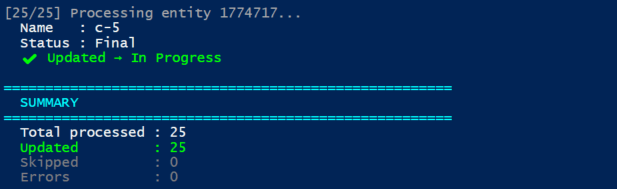
Tracking Results
$updated = @()
$skipped = @()
$errors  = @()
Tracking enables:
- Reporting outcomes.
- Debugging issues.
- Auditing operations.

Customizing the Script for Generic Use
1. Make Lifecycle Dynamic
$targetLifecycleId = 9795
This allows changing the target state without modifying the core logic.
2. Generalize Relation Updates
$relationName = "ContentLifeCycleToContent"
You can reuse the same logic for:
- Taxonomy assignments.
- Category updates.
- Ownership relations.
3. Add Retry Logic
Introduce retries for transient failures:
# Retry logic with limited attempts
This improves reliability in production environments.
4. Enable Batch or Parallel Processing
For large datasets:
- Process entities in batches.
- Use parallel execution strategies.
- Reduce total execution time.
5. Extend to New Operations
This pattern can be adapted for:
| Operation | Modification |
|---|---|
| Metadata update | Modify JSON payload. |
| Publish actions | Call publishing endpoints. |
| Field updates | Change property values. |
| Workflow automation | Trigger state transitions. |
Summary of the Approach
Bulk updating content in Sitecore Content Hub requires more than simple scripting. It involves understanding how entities, properties, and relations interact.
By using API-driven automation, teams can efficiently manage large-scale updates with precision and control.
Key Takeaways
- Lifecycle changes are handled through relations, not fields.
- Validation is essential before applying updates.
- Dry-run capability prevents unintended changes.
- Centralized API handling improves maintainability.
- Logging provides visibility and traceability.
Final Thought
Manual bulk updates limit scalability and introduce unnecessary risk. A structured, API-driven approach ensures efficiency, consistency, and long-term maintainability in modern content platforms.

Keyur Nayi- Technical lead - ADDACT
Technical lead - ADDACT
Keyur is a Technical Lead at Addact with 9+ years of experience in enterprise CMS and software engineering. He is certified in Sitecore XM Cloud, OrderCloud, Sitecore 10 .NET, and SitecoreAI CMS for Developers (2025), specializing in scalable, cloud-ready and AI-driven implementations.
His technical stack includes ASP.NET/Core, C#, MVC, jQuery, and Azure/AWS, enabling high-performance, cross-platform digital solutions.